18

Not Visiting the US

I won’t be visiting the US in the forseeable future.

For some time I have been concerned about the malfunctioning legal process and other related issues that arose from the so-called “War On Terror“. But the most recent news is that the TSA may just copy all the contents of your laptop or even steal it [1].

Law enforcement agents can search property if they see evidence of a crime in progress or if they have a search warrant. They can seize property as evidence in a trial, but if the property in question is not illegal then it will be returned afterwards.

The TSA take property from travellers without any reason for doing so and do not return it. This is not law enforcement, it is banditry.

It’s bad enough catching a late train while carrying a laptop and risking a junkie trying to steal it. When bandits have police protection (as the TSA do) then it becomes an unacceptable risk.

The TSA have recently apologised for making people remove iPods and other devices from their luggage [2]. Strangely this has been interpreted by some people to mean that the TSA won’t be stealing data and hardware from travellers. I’m sure that if the TSA was going to stop searching laptop hard drives and confiscating laptops then they would have announced it.

From now on I will avoid entering US territory (even for connecting flights), except in the unlikely event that someone pays me an unreasonably large amount of money such that I am prepared to travel without electronic gear.

I know that some people in the US won’t like this (some people flip out when anything resembling a Boycott is mentioned). I am not Boycotting the US, merely avoiding bandits. If the fear of bandits hurts your business then you need to get a law enforcement system that can deal with the problem.

On a related note, check out the TSA Gangstaz [3] video, funny.

10

Redirecting Output from a Running Process

Someone asked on a mailing list how to redirect output from a running process. They had a program which had been running for a long period of time without having stdout redirected to a file. They wanted to logout (to move the laptop that was used for the ssh session) but not kill the process (or lose output).

Most responses were of the form “you should have used screen or nohup” which is all very well if you had planned to logout and leave it running (or even planned to have it run for a long time).

Fortunately it is quite possible to redirect output of a running process. I will use cat as a trivial example but the same technique will work for most programs that do simple IO (of course programs that do terminal IO may be more tricky – but you could always redirect from the tty device of a ssh session to the tty device of a screen session).

Firstly I run the command “cat > foo1” in one session and test that data from stdin is copied to the file. Then in another session I redirect the output:

Firstly find the PID of the process:
$ ps aux|grep cat
rjc 6760 0.0 0.0 1580 376 pts/5 S+ 15:31 0:00 cat

Now check the file handles it has open:
$ ls -l /proc/6760/fd
total 3
lrwx—— 1 rjc rjc 64 Feb 27 15:32 0 -> /dev/pts/5
l-wx—— 1 rjc rjc 64 Feb 27 15:32 1 -> /tmp/foo1
lrwx—— 1 rjc rjc 64 Feb 27 15:32 2 -> /dev/pts/5

Now run GDB:
$ gdb -p 6760 /bin/cat
GNU gdb 6.4.90-debian
Copyright (C) 2006 Free Software Foundation, Inc
[lots more license stuff snipped]
Attaching to program: /bin/cat, process 6760
[snip other stuff that’s not interesting now]
(gdb) p close(1)
$1 = 0
(gdb) p creat(“/tmp/foo3”, 0600)
$2 = 1
(gdb) q
The program is running. Quit anyway (and detach it)? (y or n) y
Detaching from program: /bin/cat, process 6760

The “p” command in GDB will print the value of an expression, an expression can be a function to call, it can be a system call… So I execute a close() system call and pass file handle 1, then I execute a creat() system call to open a new file. The result of the creat() was 1 which means that it replaced the previous file handle. If I wanted to use the same file for stdout and stderr or if I wanted to replace a file handle with some other number then I would need to call the dup2() system call to achieve that result.

For this example I chose to use creat() instead of open() because there are fewer parameter. The C macros for the flags are not usable from GDB (it doesn’t use C headers) so I would have to read header files to discover this – it’s not that hard to do so but would take more time. Note that 0600 is the octal permission for the owner having read/write access and the group and others having no access. It would also work to use 0 for that parameter and run chmod on the file later on.

After that I verify the result:
ls -l /proc/6760/fd/
total 3
lrwx—— 1 rjc rjc 64 2008-02-27 15:32 0 -> /dev/pts/5
l-wx—— 1 rjc rjc 64 2008-02-27 15:32 1 -> /tmp/foo3 <====
lrwx—— 1 rjc rjc 64 2008-02-27 15:32 2 -> /dev/pts/5

Typing more data in to cat results in the file /tmp/foo3 being appended to.

Update: If you want to close the original session you need to close all file handles for it, open a new device that can be the controlling tty, and then call setsid().

4

Hot Plug and How to Defeat It

Finally I found the URL of a device I’ve been hearing rumours about. The HotPlug is a device to allow you to move a computer without turning it off [1]. It is described as being created for “Government/Forensic customers” but is also being advertised for moving servers without powering them down.

The primary way that it works is by slightly unplugging the power plug and connecting wires to the active and neutral terminals, then when mains power is no longer connected it supplies power from a UPS. When mains power is re-connected the UPS is cut off.

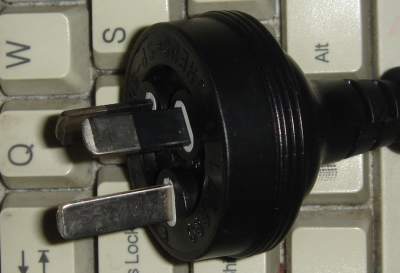
Australian 240 volt 10 amp mains power plug

Modern electrical safety standards in most countries require that exposed pins of a power plug (other than the earth) be shielded to prevent metal objects or the fingers of young children from touching live conductors. The image above shows a recent Australian power plug which has the active and neutral pins protected with plastic such that if the plug is slightly removed there will be no access to live conductors. I have photographed it resting on a keyboard so that people who aren’t familiar with Australian plugs can see the approximate scale.

I’m not sure exactly when the new safer plugs were introduced, a mobile phone I bought just over three years ago has the old-style plug (no shielding) while most things that I bought since then have it. In any case I expect that a good number of PCs being used by Australian companies have the old style as I expect that some machines with the older plugs haven’t reached their three year tax write-down period.

For a device which has a plug with such shielding they sell kits for disassembling the power lead or taking the power point from the wall. I spoke to an an electrician who assured me that he could with a 100% success rate attach to wires within a power cord without any special tools (saving $149 of equipment that the HotPlug people offer). Any of these things will need to be implemented by a qualified electrician to be legal, and any electrician who has been doing the job for a while probably has a lot of experience working before the recent safety concerns about “working live“.

The part of the web site which concerns moving servers seems a little weak. It seems to be based on the idea that someone might have servers which don’t have redundant PSUs (IE really cheap machines – maybe re-purposed desktop machines) which have to be moved without any down-time and for which spending $500US on a device to cut the power (plus extra money to pay an electrician to use it) is considered a good investment. The only customers I can imagine for such a device are criminals and cops.

I also wonder whether you could get the same result with a simple switch that cuts from one power source to another. I find that it’s not uncommon for brief power fluctuations to cause the lights to flicker but for most desktop machines to not reboot. So obviously the capacitors in the PSU and on the motherboard can keep things running for a small amount of time without mains power. That should be enough for the power to be switched across to another source. It probably wouldn’t be as reliable but a “non-government” organisation which desires the use of such devices probably doesn’t want any evidence that they ever purchased one…

Now given that such devices are out there, the question is how to work around them. One thing that they advertise is “mouse jigglers” to prevent screen-lock programs from activating. So an obvious first step is to not allow jiggling to prevent the screen-saver. Forcing people to re-authenticate periodically during their work is not going to impact productivity much (of course the down-side is that it offers more opportunities for shoulder-surfing authentication methods).

Once a machine is taken the next step is to delay or prevent an attacker from reading the data. If an attacker has the resources of a major government behind them then they could read the bus of the machine to extract data and maybe isolate the CPU and send memory read commands to system memory to extract all data (including the keys for decrypting the hard drive). The only possible defence against that would be to have multiple machines exchanging encrypted heart-beat packets and configured to immediately shut themselves down if all other machines stop sending packets to them. But if defending against an attacker with more modest resources the shutdown period could be a lot longer (maybe a week without a successful login).

Obviously an attacker who gets physical ownership of a running machine will try and crack it. This is where all the OS security features we know can be used to delay them long enough to allow an automated shut-down that will remove the encryption keys from memory.

6

Low Power – They Just Don’t get it

For a while I’ve been reading the Lenovo blog Inside The Box [1], even though I plan to keep my current laptop for a while [2] (and therefore not buy another Thinkpad for a few years) I am interested in the technology for it’s own sake and read the blog.

A recent post concerns a new desktop machine billed as “our greenest desktop ever” [3]. The post has some interesting information on recycling plastic etc, and the fact that the machine in question is physically small (a volume of 4.5L and no PCI expansion slots) means that less petro-chemicals are used in manufacture (and some of the resins used are recycled). However the electricity use is 47W when idle!!!

On my documents blog I have a post about the power use of computers I own(ed) [4] which includes my current Thinkpad (idles at 23W) and an IBM P3 desktop system which idles at 38W. Both machines in question were manufactured before Lenovo bought Thinkpad and IBM’s desktop PC business (so they technically aren’t Lenovo machines) and they weren’t manufactured with recycled resins. But the claim that the new machine is the greenest ever is at best misguided and could be regarded as deceptive.

I think that the machine is quite decent, but it’s obvious that they can do a lot better. There’s no reason that a low-power desktop machine (which uses some laptop technology) should take more than twice the power of what was a high-end laptop a few years ago. Also comparing power use with P3 machines (which are still quite useful now, my IBM P3 desktop runs 24*7 as a server) is quite relevant – and we should keep in mind that before the Pentium was released no system which an individual could afford had anything other than a simple heat-sink to cool it’s CPU.

This is largely a failing of Intel and AMD to make power efficient CPUs and chipsets. It’s also unfortunate that asymmetric multi-processing has not been implemented in recent times. A system with a 64bit CPU core of P3 performance as well as some Opteron class cores that could be suspended independently would be very good for power use with correct OS support. For example when reading documents and email my system will spend most of it’s time idling (apart from when I use Firefox which is a CPU hog) and the CPU use will be minimal for scrolling – a P3 performing core would be more than adequate for that task (which comprises a significant portion of my computer use). Then when I launch a CPU intensive task (composing a blog post in WordPress or compiling) the more powerful CPU cores could start.

It would be good if Intel would release a Pentium-M CPU (32bit) with the latest technology (smaller tracks on the silicon means less power use as well as higher clock speeds). A Pentium-M running at 2GHz produced with the latest Intel fabrication technology would probably use significantly less power than the 1.7GHz Pentium-M that is in my Thinkpad. Put that in a desktop machine and you would have all the compute power you need for most tasks other than playing games and running vista and you could get an idle power less than 23W.

The new Lenovo machine in question does sound like a nice machine, I wouldn’t mind having one for testing and running demos. But the claims made about it seem poorly justified if you know the history.

23

Fluorescent vs Incandescent lights

Glen Turner writes about silly people who think that fluorescent lights don’t save energy over their lifetime [1].

A compact fluorescent light (one that is designed for the same socket as an incandescent globe) is not the most efficient light source, the Luminous Efficiency page on Wikipedia [2] lists a CFL as having an efficiency of between 6.6% and 8.8% while fluorescent tubes can be up to 15.2% efficient and low pressure sodium lamps are 27% efficient! But given that low pressure sodium lights are unsuitable for most uses due to being monochromatic and having a long warm-up time and the fact that fluorescent tubes are often not suitable due to design an 8.8% efficiency is pretty good. LEDs can give up to 10.2% (and prototypes offer 22%) but don’t seem to be available in a convenient and reliable manner (they are expensive and the ones I’ve tried have been unreliable).

When comparing fluorescent with incandescent one factor to consider is the power used. While high-temperature incandescent lights are quoted as having 5.1% efficiency and a 100W 110V tungsten incandescent globe is quoted as having 2.6% efficiency a 40W 110V globe will only have 1.9%. If you want to save energy then you probably don’t want to use 100W globes, using less light is the first way of saving energy on lighting! So the efficiency of incandescent lights used for the comparison should probably be closer to 1.9% than 2.6%.

Now the theoretical performance won’t always match what you get when you buy globes. There is some variation of quality between manufacturers and there are at least two distinct “colours” of fluorescent lights (one is about 5800K – similar to our sun, the other is something over 8000K – blue-white), I expect some difference in efficiency between lights of different colour range.

I see CFL lights marketed as being 5 times more efficient than incandescent lights, my observation is that they appear to be about 4 times more efficient (IE I replace a 40W incandescent with a 10W CFL or a 60W incandescent with a 14W CFL). Glen claims that an 8W CFL can replace a 60W incandescent globe, the only possibility of getting a factor of 7 or more efficiency improvement (according to the data on the Wikipedia page) would be to replace some 5W incandescent globes with CFL. In my experience (converting two houses that I lived in to CFL and the conversions of some friends) such an efficiency benefit is not possible on direct electricity use.

However in a hot climate any waste heat needs to be removed with an air-conditioner. So when a 60W incandescent light is replaced by a 14W CFL there is 46W of waste heat removed, with an ideal efficiency of a heat-pump it would take 15W to remove that heat from a building (and possibly more if it’s a large building). So in summer we are not comparing 60W to 14W, it’s more like 75W to 14W.

The issue of economics that Glen raises is more complex than it seems because governments often give companies significant discounts on electricity costs, EG in Australia aluminium refineries are subsidies heavily so they pay much less than home users. So hypothetically it could be possible to manufacture a device made entirely of aluminium which saves electricity (and therefore money for the user) but not enough to cover the electricity used in aluminium refining. However when we consider the margins of the various middle-men it seems quite unlikely that such a hypothetical situation could actually happen.

As for the issue of mercury in fluorescent lights there are two things to consider. One is that it is possible to recycle mercury (in Australia at least), the other is that coal fired power plants have a lot of mercury in their smoke…

1

New Bonnie++ Releases

Today I released new versions of my Bonnie++ [1] benchmark. The main new feature (in both the stable 1.03b version and the experimental 1.93d version) is the ability of zcav to write to devices. The feature in question was originally written at the request of some people who had strange performance results when testing SATA disks [2].

Now I plan to focus entirely on the 1.9x branch. I have uploaded 1.03b to Debian/unstable but shortly I plan to upgrade a 1.9x version and to have Lenny include Bonnie++ 2.0x.

One thing to note is that Bonnie++ in the 1.9x branch is multi-threaded which does mean that lower performance will be achieved with some combinations of OS and libc. I think that this is valid as many applications that you will care about (EG MySQL and probably all other modern database servers) will only support a threaded mode of operation (at least for the default configuration) and many other applications (EG Apache) will have a threaded option which can give performance benefits.

In any case the purpose of a benchmark is not to give a high number that you can boast about, but to identify areas of performance that need improvement. So doing things that your OS might not be best optimised for is a feature!

While on this topic, I will never add support for undocumented APIs to the main Bonnie++ and ZCAV programs. The 1.9x branch of Bonnie++ includes a program named getc_putc which is specifically written to test various ways of writing a byte at a time, among other things it uses getc_unlocked() and putc_unlocked() – both of which were undocumented at the time I started using them. Bonnie++ will continue using the locking versions of those functions, last time I tested it meant that the per-char IO tests in Bonnie++ on Linux gave significantly less performance than on Solaris (to the degree that it obviously wasn’t hardware). I think this is fine, everyone knows that IO one character at a time is not optimal anyway so whether your program sucks a little or a lot because of doing such things probably makes little difference.

8

Pentium-3 vs Pentium-4

I recently was giving away some old P3 and P4 machines and was surprised by the level of interest in P4 machines. As you can see from my page on computer power use [1] the power use from a P4 system is significantly greater than that of a P3. The conventional wisdom is that the P4 takes 1.5 times as many clock cycles to perform an instruction as a P3, the old SPEC CPU2000 results [2] seem to indicate that a 1.5GHz P4 will be about 20% faster than a 1GHz P3, but as the P4 has significantly higher memory bandwidth the benefit may be significantly greater for memory intensive applications.

But generally as a rule of thumb I would not expect a low-end P4 desktop system (EG 1.5GHz) to give much benefit over a high-end P3 desktop system (1GHz for a desktop), and a 2GHz P4 server system probably won’t give any real benefit over a 1.4GHz P3 server system. So in terms of CPU use a P4 doesn’t really offer much.

One significant limitation of many P3 systems (and most name-brand P3 desktop systems) is the fact that the Intel chipsets limited the system to 512M of RAM. This really causes problems when you want to run Xen or similar technologies. I have a few P4 1.5GHz systems that have three PC-133 DIMM sockets allowing up to 768M of RAM (it seems that PC-133 DIMMs only go up to 256M in size – at least the ones that cost less than the value of the machine). Another issue is USB 2.0 which seems to be supported on most of the early P4 systems but none of the P3 systems.

512M of RAM is plenty for light desktop use and small servers, my Thinkpad (my main machine) had only 768M of RAM until very recently and it was only Xen that compelled me to upgrade. The extra power use of a P4 is significant, my 1.5GHz P4 desktop systems use significantly more power than a Celeron 2.4GHz (which is a much faster machine and supports more RAM etc). Low-end P4 systems have little going for them except for 50% more RAM (maybe – depends on how many sockets are on the motherboard) and USB 2.0.

So it seems strange that people want to upgrade from a P3 system to a P4.

20

Conditions of Sending Email

Update: Due to the popularity of this post I have created a T-Shirt and put it on sale at http://www.cafepress.com/email_eula .

Update: Unlike most of my blog content I permit anyone to copy most or all of this post for commercial use (this includes blogs with google advertising) as long as they correctly identify me as the author. Usually I only allow such mirroring for non-commercial sites.

Update: I now have a copy of this post at http://doc.coker.com.au/legal/conditions-email/ which I will modify if necessary.

I have previously written about using a SMTP protocol level disclaimer to trump any legalistic sigs [1].

The conditions of sending mail to my server are now as follows:

  1. A signature will in no way restrict my use of your message. You sent the message to me because you want me to read it (it was not mis-sent, my mail server does not accept mis-addressed mail). I will keep the message as long as I like either deliberately or because I forgot to delete it.
  2. I reserve the right to publish any email that is threatening (including any threats of legal action). I don’t like being threatened and part of my defence is to publish such threats at an appropriate time. Anyone who is considering the possibility of threatening me should consider when their threat may re-appear.
  3. I reserve the right to publish any email that is abusive/profane, is a confession of criminal or unethical behaviour, or is evidence that the sender is a liar or insane.
  4. I reserve the right to forward all amusing email to my friends for their enjoyment.

My mail server will now provide the URL of this page to everyone who connects at the first stage of the SMTP protocol. When a mail server continues the connection that indicates acceptance of these conditions.

This doesn’t mean that I wildly forward email and business discussions are kept confidential of course. I expect that most people don’t keep mail secret when it matches the conditions in my list above, unlike most people I’m publishing the list of reasons.

11

Better Social Networking

When advogato.org was still cool I signed up to it. It was an interesting research project in skill metrics (determining the rating of people’s coding skills by the votes of others and weighting the votes by the rating of each person), and it was nice to be rated Master soon after I joined. I still use it on occasion for the blog syndication feature (when I find a good blog on Advogato I add it to my Planet installation).

When orkut.com was really cool (when every time I had dinner with a group of people someone would ask if they could be an “orkut friend”) I signed up to it. It was interesting for a while but then most people got bored with it.

Now there is Facebook and MySpace for social networking for social purposes and LinkedIn.com for business related social networking. I periodically get invited to join those services but have not been interested in any other than LinkedIn. I can’t join LinkedIn because their mail server is regarded as a SPAM source by my mail server but their web server refuses to provide any information on why this is (the rejection was apparently long enough ago that it’s rolled off my logs).

The problem with all these services is that I am expected to sign up with each of them and go to a moderate amount of effort in writing up all the data in the various web pages. Writing it is a pain, keeping it up to date is more pain, and dealing with spam in “scrap-book” entries in Orkut is still an annoyance which I don’t want to multiply by four!

So far the only step I’ve seen towards addressing this issue is the XFN – XHTML Friends Network [1] project. But that seems to be of fairly limited scope (just referring to the friendship status of people in a <a href link).

I believe that the requirements for social networking are:

  1. Personal data about each person, some of which may only be available to friends or friends of friends.
  2. The user owns their own data, has full control over where it’s sent and the ability to request people who receive it to keep some parts of it secret.
  3. Ability to send email to friends of friends (determined by the wishes of each friend and FOAF).
  4. Ability to get a list of friends of friends.
  5. Incorporation of a standard format for CVs (for business social networking).

I think that the only way to go is to have a standard XML format for storing all personal data (including financial, career, and CV data) that can be used on any web site. Then someone who wants to be involved in social networking could create an XML file for a static web server (or multiple files with different content and password protected access), or they could have a server-side script generate an XML file on the fly with a set of data that is appropriate for the reader. The resulting social network would be entirely distributed and anyone could write software to join in. This covers item 1 and part of item 2.

For sending email to friends of friends it would be good to avoid spam as much as possible. One way of doing would be requesting that friends publish a forwarding address on their own mail server in a manner similar to SRS [2]. SRS include the ability for such addresses to expire after a certain period of time (which would be convenient for this). In fact publishing SRS versions of friends email addresses would be a good option if you already use SPF [3] and SRS in your mail server. This covers item 3.

The XML format could include information on how far the recipient could transfer it. For example if my server sent an XML file to a recruiting agency with my CV it could state that they could distribute it without restriction (so that they can give it to hiring managers) with the possibility of some fields being restricted (EG not tell the hiring manager what I used to get paid). For my mobile phone number I could send it to my friends with a request that they not send it on. This covers part of item 2.

The URL for the friends file would of course be in the main XML file, and therefore you could have different friends lists published from different versions of your profile (EG the profile you send to recruiting agencies wouldn’t include drinking buddies etc). This completes the coverage of item 2.

Then to have a friends list you have a single XML file on a web server that has the public parts of the XML files from all your friends. This means that getting a list of friends of friends would involve getting a single XML file for each friend (if you have 100 friends and each friend has 50 unique friends on average then you do 100 HTTP operations instead of 5,000). Minimising the number of web transfer operations is essential for performance and for reliability in the face of unreliable web servers (there is no chance of having 5,000 random web servers for individuals all up and accessible at the same time). This covers item 4.

Item 5 is merely a nice thing to have which allows more easily replacing some of the recruiting infrastructure. As any such XML format will have several sections for arbitrary plain text (or maybe HTML) for describing various things the CV could of course be in HTML, but it would be good to have the data in XML.

I posted this in the “blog” category because blogs are the only commonly used systems where end users do anything related to XML files (the RSS and ATOM feeds are XML). A blog server could easily be extended to do these social networking systems.

As with a blog users could run their own social networking server (publishing their XML files) or they could use a service that is similar in concept to blogger which does it all for them (for the less technical users). Then an analogy to Planet, Technorati, etc in the blog space would be public aggregation services that compare people based on the number of friends they have etc, and attempts to map paths between people based on friends.

This could also include GPG [4] data such that signing someone’s GPG key would cause your server to automatically list them in some friend category. The XML format should also have a field for a GPG signature (one option would be to use a GPG sub-key to sign the files and have the sub-key owned by the server).

I don’t have any serious time to spend on implementing this at the moment. But if someone else starts coding such a project then I would certainly help test it, debug it, and contribute towards the XML design.

17

Software vs Hardware RAID

Should you use software or hardware RAID? Many people claim that Hardware RAID is needed for performance (which can be true) but then claim that it’s because of the CPU use of the RAID calculations.

Here is the data logged by the Linux kernel then the RAID-5 and RAID-6 drivers are loaded on a 1GHz Pentium-3 system:

raid5: automatically using best checksumming function: pIII_sse
  pIII_sse  :  2044.000 MB/sec
raid5: using function: pIII_sse (2044.000 MB/sec)
raid6: int32x1    269 MB/s
raid6: int32x2    316 MB/s
raid6: int32x4    308 MB/s
raid6: int32x8    281 MB/s
raid6: mmxx1      914 MB/s
raid6: mmxx2    1000 MB/s
raid6: sse1x1    800 MB/s
raid6: sse1x2    1046 MB/s
raid6: using algorithm sse1x2 (1046 MB/s)

There are few P3 systems that have enough IO capacity to support anywhere near 2000MB/s of disk IO and modern systems give even better CPU performance.

The fastest disks available can sustain about 80MB/s when performing contiguous disk IO (which incidentally is a fairly rare operation). So if you had ten fast disks performing contiguous IO then you might be using 800MB/s of disk IO bandwidth, but that would hardly stretch your CPU performance. It’s obvious that CPU performance of the XOR calculations for RAID-5 (and the slightly more complex calculations for RAID-6) is not a bottleneck.

Hardware RAID-5 often significantly outperforms software RAID-5 (in fact it should always outperform software RAID-5) even though in almost every case the RAID processor has significantly less CPU power than the main CPU. The benefit for hardware RAID-5 is in caching. A standard feature in a hardware RAID controller is a write-back disk cache in non-volatile RAM (RAM that has a battery backup and can typically keep it’s data for more than 24 hours without power). All RAID levels benefit from this but RAID-5 and RAID-6 gain particular benefits. In RAID-5 a small write (less than the stripe size) requires either that all the blocks other than the ones to be written are read or that the original content of the block to be written and the parity block are read – in either case writing less than a full stripe to a RAID-5 requires some reads. If the write-back cache can store the data for long enough that a second write is performed to the same stripe (EG to files being created in the same Inode block) then performance may double.

There is one situation where software RAID will give better performance (often significantly better performance), that is for low-end hardware RAID devices. I suspect that some hardware RAID vendors deliberately cripple the performance of low-end RAID devices (by using an extremely under-powered CPU among other things) to drive sales of the more expensive devices. In 2001 I benchmarked one hardware RAID controller as being able to only sustain 10MB/s for contiguous read and write operations (software RAID on lesser hardware would deliver 100MB/s or more). But for random synchronous writes the performance was great and that’s what mattered for the application in question.

Also there are reliability issues related to write-back caching. In a well designed system an update of an entire RAID-5 stripe (one block to each disk including the parity block) will first be performed to the cache and then the cache will be written back. If the power fails while the write is in progress then it will be attempted again when power is restored thus ensuring that all disks have the same data. With any RAID implementation without such a NVRAM cache a write to the entire stripe could be partially successful. This means that the parity block would not match the data! In such a situation the machine would probably work well (fsck would ensure that the filesystem state was consistent) until a disk failed. When the RAID-5 recovery procedure is used after a disk is failed it uses the parity block to re-generate the missing data, but if the parity doesn’t match then the re-generated data will be different. A disk failure may happen while the machine is online and this could potentially result in filesystem and/or database meta-data changing on a running system – this is a bad situation that most filesystems and databases will not handle well.

A further benefit of a well designed NVRAM cache is that it can be used on multiple systems. For their servers HP makes some guarantees about which replacement machines will accept the NVRAM module. So if you have a HP server running RAID-5 with an NVRAM cache then you could have the entire motherboard die, have HP support provide a replacement server, then when the replacement machine is booted with the old hard drives and NVRAM module installed the data in the write-back cache will be written! This is a significant feature for improving reliability in bad corner cases. NB I’m not saying that HP is better than all other RAID vendors in this regard, merely that I know what HP equipment will do and don’t know about the rest.

It would be good if there was a commodity standard for NVRAM on a PC motherboard. Perhaps a standard socket design that Intel could specify and that every motherboard manufacturer would eventually support. Then to implement such things on a typical PC all that would be required would be the NVRAM module, which while still being expensive would be significantly cheaper than current prices due to the increase in volume. If there was a significant quantity of PCs with such NVRAM (or which could be upgraded to it without excessive cost) then there would be an incentive for people to modify the Linux sotware RAID code to use it and thus give benefits for performance and reliability. Then it could be possible to install a NVRAM module and drives in a replacement server with Linux software RAID and have the data integrity preserved. But unless/until such things happen write-back caching that preserves the data integrity requires hardware RAID.

Another limitation of Linux software RAID is expanding RAID groups. A HP server that I work on had two disks in a RAID-1 array, one of my colleagues added an extra disk and made it a RAID-5, the hardware RAID device moved the data around as appropriate while the machine was running and the disk space was expanded without any down-time. Some similar things can be done with Linux, for example here is documentation on converting RAID-1 to RAID-5 with Linux software RAID [1]. But that conversion operation requires some down-time and is not something that’s officially supported, while converting RAID-1 to RAID-5 with HP hardware RAID is a standard supported feature.