

3

Google Chrome and SE Linux

Google Chrome saying aw snap when it crashes

[107108.433300] chrome[12262]: segfault at bbadbeef ip 0000000000fbea18 sp 00007fffcf348100 error 6 in chrome[400000+27ad000]

When I first tried running the Google Chrome web browser [1] on SE Linux it recursively displayed the error message in the above picture, it first displayed the error and then displayed another error while trying to display a web page to describe the error. The kernel message log included messages such as the above message, it seems that some pointers are initialised to the value 0xbbadbeef to make debugging easier and more amusing.

V8 error: V8 is no longer usable (v8::V8::AddMessageListener())

When I ran Chrome from the command-line it gave the above error message (which was presumably somewhere in the 8MB ~/.xsession-errors file generated from a few hours of running a KDE4 session).

type=AVC msg=audit(1274070733.648:145): avc: denied { execmem } for pid=12833 comm=”chrome” scontext=unconfined_u:unconfined_r:unconfined_t:s0-s0:c0.c1023 tcontext=unconfined_u:unconfined_r:unconfined_t:s0-s0:c0.c1023 tclass=process
type=SYSCALL msg=audit(1274070733.648:145): arch=c000003e syscall=9 success=no exit=-131938567594024 a0=7fd863b41000 a1=40000 a2=7 a3=32 items=0 ppid=1 pid=12833 auid=4294967295 uid=1001 gid=1001 euid=1001 suid=1001 fsuid=1001 egid=1001 sgid=1001 fsgid=1001 tty=pts4 ses=4294967295 comm=”chrome” exe=”/opt/google/chrome/chrome” subj=unconfined_u:unconfined_r:unconfined_t:s0-s0:c0.c1023 key=(null)
type=ANOM_ABEND msg=audit(1274070733.648:146): auid=4294967295 uid=1001 gid=1001 ses=4294967295 subj=unconfined_u:unconfined_r:unconfined_t:s0-s0:c0.c1023 pid=12833 comm=”chrome” sig=11

V8 is the Google Javascript system which compiles JavaScript code and thus apparently needs read/write/execute access to memory [2]. In /var/log/audit/audit.log I saw the above messages (which would have been in the kernel message log as displayed by dmesg if I didn’t have auditd running). The most relevant parts are that execmem access was requested and that it was by system call 9. From linux/x86_64/syscallent.h in the strace source I discovered that system call 9 on the AMD64 architecture is sys_mmap. Does anyone know a good way to discover which system call has a given number on a particular architecture without reading strace source code?

Attempts to strace the Google Chrome process failed, Chrome gave the error “Failed to move to new PID namespace” after clone() failed. Clone was passed the flag 0x20000000 which according to /usr/include/linux/sched.h is CLONE_NEWPID. It seems that programs which create a new PID namespace (as Google Chrome does) can’t be straced as the clone() call fails. It’s a pity that Chrome doesn’t have an option to run without using this feature, losing the ability to strace it really decreases my ability to find and report bugs in the program – I’m sure that the Google developers want people like me to be able to help them find bugs in their code without undue effort.

Anyway the solution to this problem to allow it to run on the SE Linux Targeted configuration is to run the command “chcon -t unconfined_execmem_exec_t /opt/google/chrome/chrome” which causes the Chrome browser to run in the domain unconfined_execmem_t which is allowed to do such things. Of course we don’t want Chrome processes to run unconfined, I think that the idea I had in 2008 for running Chrome processes in different SE Linux contexts is viable and should be implemented [3].

As a general rule if you are running a program from the command-line on SE Linux with the Targeted configuration (the default and most common configuration) then any time you see an execmem failure logged to the kernel message log or the audit subsystem then you can change the context of the program to unconfined_execmem_exec_t to make the problem go away. Note that this isn’t necessarily a good thing to do, sometimes it’s best to change the program to not require such access. But it seems that in this case the design of V8 requires write/execute memory access to pre-compile JavaScript code.
9

systemd – a Replacement for init etc

The systemd projecct is an interesting concept for replacing init and related code [1]. There have been a few attempts to replace the old init system, upstart is getting some market share in Linux distributions and Solaris has made some interesting changes too.

But systemd is more radical and offers more benefits. While it’s nice to be able to start multiple daemons at the same time with dependencies and doing so offers improvements to the boot times on some systems that really doesn’t lead to optimal boot times or necessarily correct behavior.

Systemd is designed around a similar concept to the wait option in inetd where the service manager (formerly inetd and now the init that comes with systemd) binds to the TCP, UDP, and Unix sockets and then starts daemons when needed. It apparently can start the daemons as needed which means you don’t have a daemon running for months without serving a single request. It also implements some functionality similar to automount which means you can start a daemon before a filesystem that it might need has been fscked.

This means that a large part of the boot process could be performed in reverse. The current process is to run fsck on all filesystems, mount them, run back-end server processes such as database servers and then run servers that need back-end services (EG a web server using a database server). The systemd way would be for process 1 to listen on port 80 and it could then start the web server when a connection is established to port 80, start the database server when a connection is made to the Unix domain socket, and then mount the filesystem when the database server tries to access it’s files.

Now it wouldn’t be a good idea to start all services on demand. Fsck can take hours on some filesystems and is never quick at the best of times. Starting a major daemon such as a database server can also take some time. So a daemon that is known to be necessary for normal functionality and which takes some time to start could be started before a request comes in. As fsck is not only slow but usually has little scope for parallelisation (EG there’s no point running two instances of fsck when you only have one hard disk), so hints as to which filesystem to be checked first would need to be used.

Systemd will require more SE Linux integration than any current init system. There is ongoing debate about whether init should load the SE Linux policy, Debian has init loading the policy while Fedora and Ubuntu have the initramfs do it. Systemd will have to assign the correct SE Linux context to Unix domain socket files and listening sockets for all the daemons that support it (which means that the policy will have to be changed to allow all domains to talk to init). It will also have to manage dbus communication in an appropriate way which includes SE Linux access controls on messages. These features mean that the amount of SE Linux specific code in systemd will dwarf that in sysvinit or Upstart – which among other things means that it really wouldn’t make sense to have an initramfs load the policy.

They have a qemu image prepared to demonstrate what systemd can do. I was disappointed that they prepared the image with SE Linux disabled. All I had to do to get it working correctly was to run the command “chcon -t init_exec_t /usr/local/sbin/systemd” and then configure GRUB to not use “selinux=0” on the kernel command line.

Another idea is to have systemd start up background processes for GUI systems such as KDE and GNOME. Faster startup for KDE and GNOME is a good thing, but I really hope that no-one wants to have process 1 manage this! Having one copy of systemd run as root with PID 1 to start daemons and another copy of the same executable run as non-root with a PID other than 1 to start user background processes is the current design which makes a lot of sense. But I expect that some misguided person will try to save some memory by combining two significantly different uses for process management.

Upgrading a SE Linux system to Debian/Testing (Squeeze)

Upgrade Requirements

Debian/Squeeze (the next release of Debian) will be released some time later this year. Many people are already upgrading test servers, and development systems and workstations that are used to develop code that will be deployed next year. Also there are some significant new features in Squeeze that compel some people to upgrade production systems now (such as a newer version of KVM and Ext4 support).

I’ve started working on an upgrade plan for SE Linux. The first thing you want when upgrading between releases is a way of supporting booting a new kernel independently of the other parts of the upgrade. Either supporting the old user-space with the new kernel or the new kernel with the old user-space. It’s not that uncommon for a new kernel to have a problem when under load so it’s best to be able to back out of a kernel upgrade temporarily while trying to find the cause of the problem. For workstations and laptops it’s not uncommon to have a kernel upgrade not immediately work with some old hardware, this can usually be worked around without much effort, but it’s good to be able to keep systems running while waiting for a response to a support request.

Running a Testing/Unstable kernel with Lenny Policy

deb http://www.coker.com.au lenny selinux

In Lenny the version of selinux-policy-default is 2:0.0.20080702-6. In the above APT repository I have version 2:0.0.20080702-18 which is needed if you want to run a 2.6.32 kernel. The main problem with the older policy is that the devtmpfs filesystem that is used by the kernel for /dev in the early stages of booting [1] is not known and therefore unlabeled – so most access to /dev is denied and booting fails. So before upgrading to testing or unstable it’s a really good idea to install the selinux-policy-default package from my Lenny repository and then run “selinux-policy-upgrade” to apply the new changes (by default upgrading the selinux-policy-default package doesn’t change the policy that is running – we consider the running policy to be configuration files that are not changed unless the user requests it).

There are also some other kernel changes which require policy changes such as a change to the way that access controls are applied to programs that trigger module load requests.

Upgrading to the Testing/Unstable Policy

While some details of the policy are not yet finalised and there are some significant bugs remaining (in terms of usability not security) the policy in Unstable is usable. There is no need to rush an upgrade of the policy, so at this stage the policy in Unstable and Testing is more for testers than for serious production use.

But when you upgrade one thing you need to keep in mind is that we don’t to support upgrading the SE Linux policy between different major versions of Debian while in multi-user mode. The minimum requirement is that after the new policy package is installed you run the following commands and then reboot afterwards:

setenforce 0
selinux-policy-upgrade
touch /.autorelabel

If achieving your security goals requires running SE Linux in enforcing mode all the time then you need to do this in single-user mode.

The changes to names of domains and labeling of files that are entry-points for domains is significant enough that it’s not practical to try and prove that all intermediate states of partial labeling are safe and that there are suitable aliases for all domains. Given that you need to reboot to install a new kernel anyway the reboot for upgrading the SE Linux policy shouldn’t be that much of an inconvenience. The relabel process on the first boot will take some time though.

Running a Lenny kernel with Testing/Unstable Policy

In the original design SE Linux didn’t check open as a separate operation, only read/write etc. The reason for this is that the goal for SE Linux was to control information flows. The open() system call doesn’t transfer any data so there was no need to restrict access to it as a separate operation (but if you couldn’t read or write a file then an attempt to open it would fail). Recent versions of the SE Linux policy have added support for controlling file open, the reason for this is to allow a program in domain A to open a file and then let a program in domain B inherit the file handle and continue using the file even if it is not normally permitted to open the file – this matches the Unix semantics where a privileged process can allow an unprivileged child to inherit file handles or use Unix domain sockets to pass file handles to another process with different privileges.

SELinux: WARNING: inside open_file_mask_to_av with unknown mode:c1b6

Unfortunately when support was added for this a bug was discovered in the kernel, this post to the SE Linux mailing list has the conclusion to a discussion about it [2]. The symptom of this problem is messages such as the above appearing in your kernel message log. I am not planning to build a kernel package for Lenny with a fix for this bug.

The command “dmesg -n 1” will prevent such messages from going to the system console – which is something you want to do if you plan to login at the console as they can occur often.

10

The Yubikey

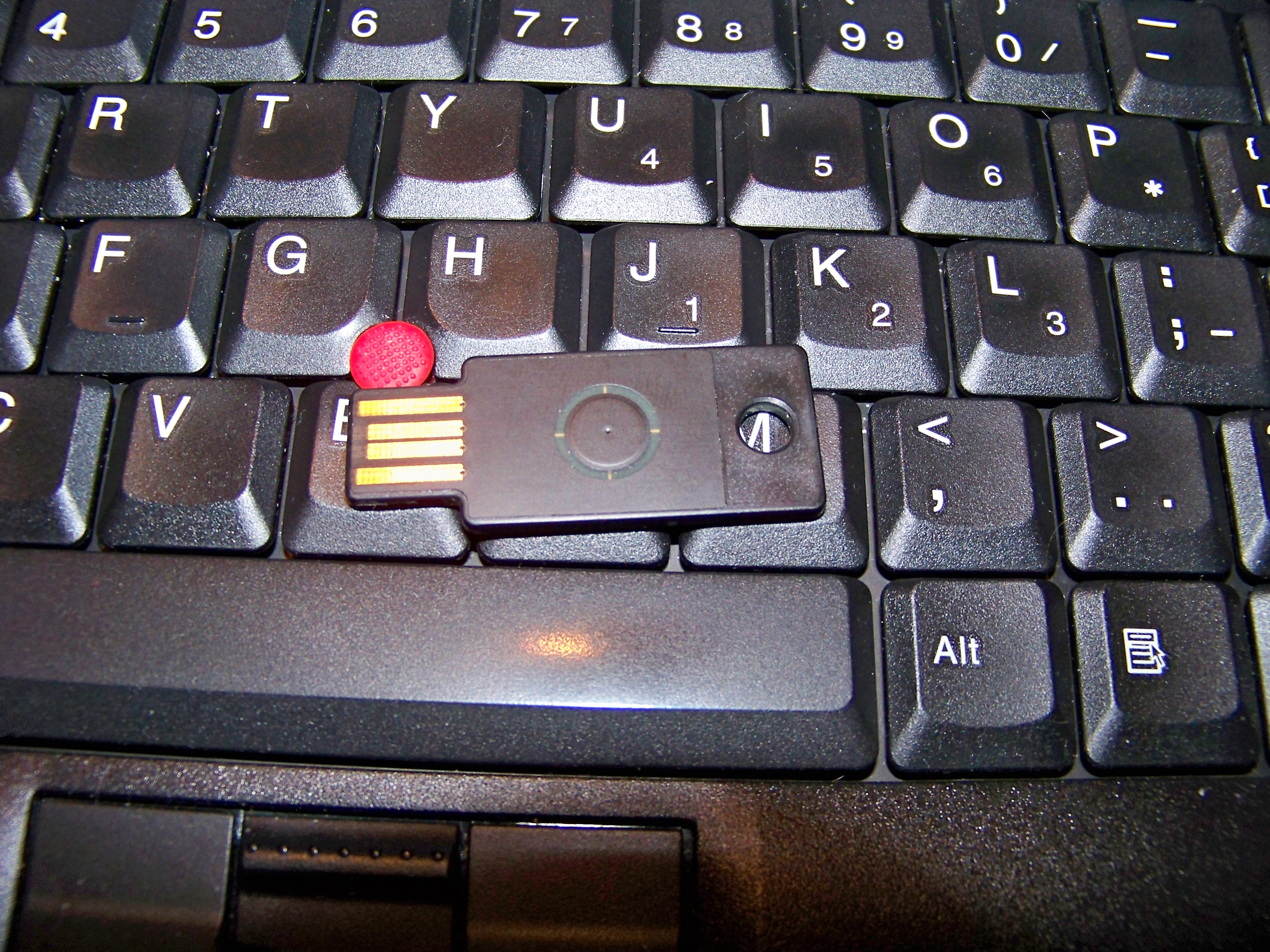
Picture of Yubikey

Some time ago Yubico were kind enough to send me an evaluation copy of their Yubikey device. I’ve finally got around to reviewing it and making deployment plans for buying some more. Above is a picture of my Yubikey on the keyboard of my Thinkpad T61 for scale. The newer keys apparently have a different color in the center of the circular press area and also can be purchased in white plastic.

The Yubikey is a USB security token from Yubico [1]. It is a use-based token that connects via the USB keyboard interface (see my previous post for a description of the various types of token [2]). The Yubikey is the only device I know of which uses the USB keyboard interface, it seems that this is an innovation that they invented. You can see in the above picture that the Yubikey skips the metal that is used to surround most USB devices, this probably fails to meet some part of the USB specification but does allow them to make the key less than half as thick as it might otherwise be. Mechanically it seems quite solid.

The Yubikey is affordable, unlike some token vendors who don’t even advertise prices (if you need to ask then you can’t afford it) and they have an online sales site. $US25 for a single key and discounts start when you buy 10. As it seems quite likely that someone who wants such a token will want at least two of them for different authentication domains, different users in one home, or as a backup in case one is lost or broken (although my experiments have shown that Yubikeys are very hardy and will not break easily). The discount rate of $20 will apply if you can find four friends who want to use them (assuming two each), or if you support several relatives (as I do). The next discount rate of $15 applies when you order 100 units, and they advise that customers contact their sales department directly if purchasing more than 500 units – so it seems likely that a further discount could be arranged when buying more than 500 units. They accept payment via Paypal as well as credit cards. It seems to me that any Linux Users Group could easily arrange an order for 100 units (that would be 10 people with similar needs to me) and a larger LUG could possibly arrange an order of more than 500 units for a better discount. If an order of 500 can’t be arranged then an order of 200 would be a good thing to get half black keys and half white ones – you can only buy a pack of 100 in a single color.

There is a WordPress plugin to use Yubikey authentication [3]. It works, but I would be happier if it had an option to accept a Yubikey OR a password (currently it demands both a Yubikey AND a password). I know that this is less secure, but I believe that it’s adequate for an account that doesn’t have administrative rights.

To operate the Yubikey you just insert it into a USB slot and press the button to have it enter the pass code via the USB keyboard interface. The pass code has a prefix that can be used to identify the user so it can replace both the user-name and password fields – of course it is technically possible to use one Yubikey for authentication with multiple accounts in which case a user-name would be required. Pressing the Yubikey button causes the pass code to be inserted along with the ENTER key, this can take a little getting used to as a slow web site combined with a habit of pressing ENTER can result in a failed login (at least this has happened to me with Konqueror).

As the Yubikey is use-based, it needs a server to track the usage count of each key. Yubico provides source to the server software as well as having their own server available on the net – obviously it might be a bad idea to use the Yubico server for remote root access to a server, but for blog posting that is a viable option and saves some effort.

If you have multiple sites that may be disconnected then you will either need multiple Yubikeys (at a cost of $20 or $15 each) or you will need to have one Yubikey work with multiple servers. Supporting a single key with multiple authentication servers means that MITM attacks become possible.

The full source to the Yubikey utilities is available under the new BSD license. In Debian the base functionality of talking to the Yubikey is packaged as libyubikey0 and libyubikey-dev, the server (for validating Yubi requests via HTTP) is packaged as yubikey-server-c, and the utility for changing the AES key to use your own authentication server is packaged as yubikey-personalization – thanks Tollef Fog Heen for packaging all this!

The YubiPAM project (a PAM module for Yubikey) is licensed under the GPL [4]. It would be good if this could be packaged for Debian (unfortunately I don’t have time to adopt more packages at the moment).

There is a new model of Yubikey that has RFID support. They suggest using it for public transport systems where RFID could be used for boarding and the core Yubikey OTP functionality could be used for purchasing tickets. I don’t think it’s very interesting for typical hobbyist and sysadmin work, but RFID experts such as Jonathan Oxer might disagree with me on this issue.

1

Types of Security Tokens

The Security Token Wikipedia page doesn’t seem to clearly describe the types of token.

Categories of Security Token

It seems to me that the following categories encompass all security tokens:

  1. Biometric tokens – which seems rather pointless to me. Having a device I control verify my biometric data doesn’t seem to provide a benefit. The only possible benefit seems to be if the biometric token verifies the identity of the person holding it before acting as one of the other types of token.
  2. Challenge-response devices. The server will send a challenge (usually a random number) and will expect a response (usually some sort of cryptographically secure hash of the number and a shared secret). A challenge-response device may take a password from the user and combine it with the challenge from the server and the shared secret when calculating the response.
  3. Time-based tokens (one-time passwords). They will provide a new pseudo-random number that changes periodically, often a 30 second time interval is used and the number is presumably a cryptographically secure hash of the time and a shared secret. This requires a battery in the token and the token will become useless when the battery runs out. It also requires that the server have an accurate clock.
  4. Use-based tokens. They will give a new pseudo-random number every time a button is pressed (or some other event happens to indicate that a number has been used). These do not work well if you have multiple independent servers and an untrusted network.

Here is my analysis of the theory of token use, note that I am not sure how the implementations of the various token systems deal with these issues.

  1. Biometric security seems like a bad idea for most non-government use. I have seen a retina scanner in use at a government office – that made some sense as the people being scanned were in a secure area (they had passed some prior checks) and they were observed (to prevent coercion and the use of fake eyes). Biometric authentication for logging in over the net just seems like a bad idea as you will never know if you can trust the scanner.
  2. It seems to me that challenge-response devices are by far the most secure option. CR is resistant to replay attacks provided that it is not possible to have re-used challenges. If the calculation of the response includes a password (which is performed on some tokens that resemble pocket calculators) then a CR token will meet the “something you have and something you know” criteria.
    One potential problem with CR systems is that of not including the server or account ID in the calculation. So if I was to use a terminal in an insecure location to login to a server or account with data that is not particularly important then it would be possible for an attacker who had compromised the terminal to perform a Man In The Middle (MITM) attack against other servers. Of course you are supposed to use a different password for each account, if you do this then a CR token that includes a password will be resistant to this attack – but I expect that people who use tokens are more likely to use one password for multiple accounts.
  3. Time-based tokens have a weakness in that an attacker who can immediately discover the number used for one connection could then immediately login to other servers. One example of a potential attack using this avenue would be to compromise a terminal in an Internet cafe, steal a hash used for logging in to server A and then immediately login to server B. This means that it may not be safe to use the same token for logging in to servers (or accounts) that have different sensitivity levels unless a strong password was used as well – I expect that people who have hardware tokens tend to use weaker passwords.
    Also one factor that will make some MITM attacks a lot easier is the fact that the combination of the hash from the token and the password are valid for a period of time so an attacker could establish a second connection within the 30 second interval. It seems that only allowing one login with a particular time-coded password is the correct thing to do, but this may be impossible if multiple independent servers use the same token.
    Time based tokens expire when the battery runs out. The measures taken to make them tamper-proof may make it difficult or impossible to replace the battery so a new token must be purchased every few years.
  4. Use-based tokens are very similar to time-based tokens, it’s just a different number that is used for generating the hash. The difference in the token is that a time-based token needs a battery so that it can track the time while a use-based token needs a small amount of flash memory to store the usage count. The difference at the server end is that for a use-based token the server needs a database of the use count of each token, which is usually not overly difficult for a single server.
    One problem is the case of a restore from backup of the server which maintains the use count database. The only secure way of managing this is to either inspect every token (to discover it’s use count) or to issue a new password (for using password plus token authentication). Either option would be really painful if you have many users at remote sites. Also it would be required to get the database transaction committed to disk before an authentication attempt is acknowledged so that a server crash could not lose the count – this should be obvious but many people get these things wrong.
    An additional complication for use-based tokens comes with the case of a token that is used for multiple servers. One server needs to maintain the database of the usage counts and the other servers need to query it by secure links. If a login attempt with use count 100 has been made to server A then server B must not accept a login with a hash that has a use count less than or equal to 100. This is firstly to cover the case where a MITM attack is used to login to server B with credentials that were previously used for server A. The second aim of this is to cover the case where a token that is temporarily unguarded is used to generate dozens of hashes – while the hashes could be immediately used it is desirable to have them expire as soon as possible, and having the next login update the use count and invalidate such hashes is a good thing.
    The requirement that all servers know the current use count requires that they all trust a single server. In some situations this may not be possible, so it seems that this only works for servers within a single authentication domain or for access to less important data.

Methods of Accessing Tokens

It seems that the following are the main ways of accessing tokens.

  • Manual entry – the user reads a number from an LCD display and types it in. This is the most portable and often the cheapest – but does require a battery.
  • USB keyboard – the token is connected to a PC via the USB port and reports itself as a keyboard. It can then enter a long password when a button is pressed. This is done by the Yubikey [1], I am not aware of anyone else doing it. It would be possible to have a token connect as a USB keyboard and also have it’s own keypad for entry of a password and a challenge used for CR authentication.
  • USB (non-keyboard) or PCCard/Cardbus (AKA PCMCIA). The token has it’s own interface and needs a special driver for the OS in question. This isn’t going to work if using an Internet cafe or an OS that the token vendor doesn’t support.
  • Bluetooth/RFID – has similar problems to the above but also can potentially be accessed by hostile machines without the owner knowing. I wouldn’t want to use this.
  • SmartCard – the card reader connects to the PC via Cardbus or USB and it has all the same driver issues. Some SmartCard devices are built in to a USB device that looks to the OS like a card reader plus a card, so it’s a USB interface with SmartCard protocols.

To avoid driver issues and allow the use on random machines it seems that the USB keyboard and manual entry types of token are best. While for corporate Intranet use it seems that a SmartCard is best as it can be used for opening doors as well, you could use a USB keyboard token (such as a Yubikey) to open doors – but it would be slower and there is no off the shelf hardware.

For low cost and ease of implementation it seems that use-based tokens that connect via the USB keyboard interface are best. For best security it seems that a smart-card or USB interface to a device with a keypad for entering a password is ideal.

10

Designing a Secure Linux System

The Threat

Bruce Schneier’s blog post about the Mariposa Botnet has an interesting discussion in the comments about how to make a secure system [1]. Note that the threat is considered to be remote attackers, that means viruses and trojan horses – which includes infected files run from USB devices (IE you aren’t safe just because you aren’t on the Internet). The threat we are considering is not people who can replace hardware in the computer (people who have physical access to it which includes people who have access to where it is located or who are employed to repair it). This is the most common case, the risk involved in stealing a typical PC is far greater than the whatever benefit might be obtained from the data on it – a typical computer user is at risk of theft only for the resale value of a second-hand computer.

So the question is, how do can we most effectively use free software to protect against such threats?

The first restriction is that the hardware in common use is cheap and has little special functionality for security. Systems that have a TPM seem unlikely to provide a useful benefit due to the TPM being designed more for Digital Restrictions Management than for protecting the user – and due to TPM not being widely enough used.

The BIOS and the Bootloader

It seems that the first thing that is needed is a BIOS that is reliable. If an attacker manages to replace the BIOS then it could do exciting things like modifying the code of the kernel at boot time. It seems quite plausible for the real-mode boot loader code to be run in a VM86 session and to then have it’s memory modified before it starts switches to protected mode. Every BIOS update is a potential attack. Coreboot replaces the default PC BIOS, it initialises the basic hardware and then executes an OS kernel or boot loader [2] (the Coreboot Wikipedia page has a good summary). The hardest part of the system startup process is initialising the hardware, Coreboot has that solved for 213 different motherboards.

If engineers were allowed to freely design hardware without interference then probably a significant portion of the computers in the market would have a little switch to disable the write line for the flash BIOS. I heard a rumor that in the days of 286 systems a vendor of a secure OS shipped a scalpel to disable the hardware ability to leave protected mode, cutting a track on the motherboard is probably still an option. Usually once a system is working you don’t want to upgrade the BIOS.

One of the payloads for Coreboot is GRUB. The Grub Feature Requests page has as it’s first entry “Option to check signatures of the bootchain up to the cryptsetup/luksOpen: MBR, grub partition, kernel, initramfs” [3]. Presumably this would allow a GPG signature to be checked so that a kernel and initrd would only be used if they came from a known good source. With this feature we could only boot a known good kernel.

How to run User Space

The next issue is how to run the user-space. There has been no shortage of Linux kernel exploits and I think it’s reasonable to assume that there will continue to be a large number of exploits. Some of the kernel flaws will be known by the bad guys for some time before there are patches, some of them will have patches which don’t get applied as quickly as desired. I think we have to assume that the Linux kernel will be compromised. Therefore the regular user applications can’t be run against a kernel that has direct hardware access.

It seems to me that the best way to go is to have the Linux kernel run in a virtual environment such as Xen or KVM. That means you have a hypervisor (Xen+Linux or Linux+KVM+QEMU) that controls the hardware and creates the environment for the OS image that the user interacts with. The hypervisor could create multiple virtual machines for different levels of data in a similar manner to the NSA NetTop project, not that this is really a required part of solving the general secure Internet terminal problem but as it would be a tiny bit of extra work you might as well do it.

One problem with using a hypervisor is that the video hardware tends to want to use features such as bus-mastering to give best performance. Apparently KVM has IOMMU support so it should be possible to grant a virtual machine enough hardware access to run 3D graphics at full speed without allowing it to break free.

Maintaining the Virtual Machine Image

Google has a good design for the ChromiumOS in terms of security [4]. They are using CGroups [5] to control access to device nodes in jails, RAM, CPU time, and other resources. They also have some intrusion detection which can prompt a user to perform a hardware reset. Some of the features would need to be implemented in a different manner for a full desktop system but most of the Google design features would work well.

For an OS running in a virtual machine when an intrusion is detected it would be best to have the hypervisor receive a message by some defined interface (maybe a line of text printed on the “console”) and then terminate and restart the virtual machine. Dumping the entire address space of the virtual machine would be a good idea too, with typical RAM sizes at around 4G for laptops and desktops and typical storage sizes at around 200G for laptops and 2T for new desktops it should be easy to store a few dumps in case they are needed.

The amount of data received by a typical ADSL link is not that great. Apart from the occasional big thing (like downloading a movie or listening to Internet radio for a long time) most data transfers are from casual web browsing which doesn’t involve that much data. A hypervisor could potentially store the last few gigabytes of data that were received which would then permit forensic analysis if the virtual machine was believed to be compromised. With cheap SATA disks in excess of 1TB it would be conceivable to store the last few years of data transfer (with downloaded movies excluded) – but such long-term storage would probably involve risks that would outweigh the rewards, probably storing no more than 24 hours of data would be best.

Finally in terms of applying updates and installing new software the only way to do this would be via the hypervisor as you don’t want any part of the virtual machine to be able to write to it’s data files or programs. So if the user selects to install a new application then the request “please install application X” would have to be passed to the hypervisor. After the application is installed a reboot of the virtual machine would be needed to apply the change. This is a common experience for mobile phones (where you even have to reboot if the telco changes some of their network settings) and it’s something that MS-Windows users have become used to – but it would get a negative reaction from the more skilled Linux users.

Would this be Accepted?

The question is, if we built this would people want to use it? The NetTop functionality of having two OSs interchangeable on the one desktop would attract some people. But most users don’t desire greater security and would find some reason to avoid this. They would claim that it lowered the performance (even for aspects of performance where benchmarks revealed no difference) and claim that they don’t need it.

At this time it seems that computer security isn’t regarded as a big enough problem for users. It seems that the same people who will avoid catching a train because one mugging made it to the TV news will happily keep using insecure computers in spite of the huge number of cases of fraud that are reported all the time.

12

Opera and Trusting Applications vs Trusting Servers

The Opera-Mini Dispute

I have just read an interesting article about the Opera browser [1]. The article is very critical of Opera-Mini on the iPhone for many reasons – most of which don’t interest me greatly. There are lots of technical trade-offs that you can make when designing an application for a constrained environment (EG a phone with low resolution and low bandwidth).

What does interest me is the criticism of the Opera Mini browser for proxying all Internet access (including HTTPS) through their own servers, this has been getting some traction around the Internet. Now it is obvious that if you have one server sitting on the net that proxies connections to lots of banks then there will be potential for abuse. What apparently isn’t obvious to as many people is the fact that you have to trust the application.

Causes of Software Security Problems

When people think about computer security they usually think about worms and viruses that exploit existing bugs in software and about Trojan horse software that the user has to be tricked into running. These are both significant problems.

But another problem is that of malicious software releases. I think that this is significantly different from Trojan horses because instead of having an application which was written for the sole purpose of tricking people (as is most similar to Greek history) you have an application that was written by many people who genuinely want to make a good product but you have a single person or small group that hijacks it.

Rumor has it that rates well in excess of $10,000 are sometimes paid for previously unknown security vulnerabilities in widely used software. It seems likely that a programmer who was in a desperate financial situation could bolster their salary by deliberately putting bugs in software and then selling the exploits, this would not be a trivial task (making such bugs appear to be genuine mistakes would take some skill) – but there are lots of people who could do it and plausibly deny any accusation other than carelessness. There have been many examples of gambling addicts who have done more foolish things to fund their habit.

I don’t think it’s plausible to believe that every security flaw which has been discovered in widely used software was there purely as the result of a mistake. Given the huge number of programmers who have the skill needed to deliberately introduce a security flaw into the source of a program and conceal it from their colleagues I think it’s quite likely that someone has done so and attempted to profit from it.

Note that even if it could be proven that it was impossible to profit from creating a security flaw in a program that would not be sufficient to prove that it never happened. There is plenty of evidence of people committing crimes in the mistaken belief that it would be profitable for them.

Should We Trust a Proprietary Application or an Internet Server?

I agree with the people who don’t like the Opera proxy idea, I would rather run a web browser on my phone that directly accesses the Internet. But I don’t think that the web browser that is built in to my current smart-phone is particularly secure. It seems usual for a PC to need a security update for the base OS or the web browser at least once a year while mobile phones have a standard service life of two years without any updates. I suspect that there is a lot of flawed code running on smart phones that never get updated.

It seems to me that the risks with Opera are the single point of failure of the proxy server in addition to the issues of code quality while the risks with the browser that is on my smart-phone is just the quality of the code. I suspect that Opera may do a better job of updating their software to fix security issues so this may mitigate the risk from using their proxy.

At the moment China is producing a significant portion of the world’s smart-phones. Some brands like LG are designed and manufactured in China, others are manufactured in China for marketing/engineering companies based in Europe and the US. A casual browse of information regarding Falun Gong makes the character of the Chinese leadership quite clear [2], I think that everything that comes out of China should be considered to be less trustworthy than equivalent products from Europe and the US. So I think that anyone who owns a Chinese mobile phone and rails against the Opera Mini hasn’t considered the issue enough.

I don’t think it’s possible to prove that an Opera Mini with it’s proxy is more or less of a risk than a Chinese smart-phone. I’m quite happy with my LG Viewty [3] – but I wouldn’t use it for Internet banking or checking my main email account.

Also we have to keep in mind that mobile phones are really owned by telephone companies. You might pay for your phone or even get it “unlocked” so you can run it on a different network, but you won’t get the custom menus of your telco removed. Most phones are designed to meet the needs of telcos not users and I doubt that secure Internet banking is a priority for a telco.

Update: You can buy unlocked mobile phones. But AFAIK the Android is the only phone which might be described as not being designed for the needs of the telcos over the needs of the users. So while you can get a phone without custom menus for a telco, you probably can’t get a phone that was specifically designed for what you want to do.

The Scope of the Problem

Mobile phones are not the extent of the problem, I think that anyone who buys a PC from a Chinese manufacturer and doesn’t immediately wipe the hard drive and do a fresh OS install is taking an unreasonable risk. The same thing goes for anyone who buys a PC from a store where it’s handled by low wage employees, I can imagine someone on a minimum income accepting a cash payment to run some special software on every PC before it goes out the door – that wouldn’t be any more difficult or risky than the employees who copy customer credit card numbers (a reasonably common crime).

It’s also quite conceivable that any major commercial software company could have a rogue employee who is deliberately introducing bugs into it’s software. That includes Apple. If the iPhone OS was compromised before it shipped then the issue of browser security wouldn’t matter much.

I agree that having the minimum possible number of potential security weak points is a good idea. They should allow Opera Mini users to select that HTTPS traffic should not be proxied. But I don’t think that merely not using a proxy would create a safe platform for Internet banking. In terms of mobile phones most things are done in the wrong way to try and get more money out of the users. Choose whichever phone or browser you want and it will probably still be a huge security risk.

Harald Welte is doing some really good work on developing free software for running a GSM network [4]. But until that project gets to the stage of being widely usable I think that we just have to accept a certain level of security risk when using mobile phones.

Play Machine Online Again

I have returned from the US and my SE Linux Play Machine [1] is online again.

It was unfortunate that I forgot to pack one of my Play machine shirts, I ended up attending a meeting of the SDForum [2] on the topic of Cloud Security (it was a joint meeting of the Cloud Services and Security SIGs) and it would have been good to have been wearing a root password.

Play Machine Offline for 2 Weeks

I’m about to leave for San Francisco, so my SE Linux Play Machine is turned off and will remain off until after I return.

1

Debian SSH and SE Linux

I have just filed Debian bug report #556644 against the version of openssh-server in Debian/Unstable (Squeeze).  It has a patch that moves the code to set the SE Linux context for the child process before calling chroot. Without this a chroot environment on a SE Linux system can only work correctly if /proc and /selinux are mounted in the chroot environment.

deb http://www.coker.com.au squeeze selinux

I’ve created the above APT repository for Squeeze which has a package that fixes this bug. I will continue to use that repository for a variety of SE Linux patches to Squeeze packages, at the moment it’s packages from Unstable but I will also modify released packages as needed.

The bug report #498684 has a fix for a trivial uninitialised variable bug. The fix is also in my build.

Also I filed the bug report #556648 about the internal version of sftp being
incompatible with SE Linux (it doesn’t involve an exec so the context doesn’t change). The correct thing to do is for sshd to refuse to run an internal sftpd at least if the system is in enforcing mode, and probably even in permissive mode.

deb http://www.coker.com.au lenny selinux

Update: I’ve also backported my sshd changes to Lenny at the above APT repository.