3

The Australian Open and Android Phones (Seer)

On Monday the 25th of January 2010 I visited the Australian Open [1] – it’s one of the world’s greatest tennis championships and it’s on in Melbourne right now. IBM sponsored my visit to show me the computer technology that they use to run the event and display the results to the world via their web site and to various media outlets.

picture of IBM Seer software running on HTC Hero

The first thing that they showed me was the IBM Seer software on the HTC Hero phone (which runs the Google Android OS). Seer can be freely downloaded from the Android store. The most noteworthy feature is that it uses the camera in the Android phone to display a picture of whatever you are looking at with points of interest superimposed (such as the above picture where I asked for locations of events and toilets). But it also displays a map view and has some other features I didn’t get a chance to test such as viewing twitter data relevant to the event. We really need this augmented reality feature enabled with tourist data for major cities. I’m sure that there’s lots of interesting things I haven’t seen in my own home city, if I could just pull out a phone and see a map of what’s around me whenever I’m bored I could see some of them. I think that this has the potential to change the way we use phones, in theory this was available as soon as Google Maps was released, but Seer seems to be the start of a whole new range of developments. One of the uses of this will be for identifying the background in tourist photos, no more of the “me in front of old building” descriptions.

Here is a Youtube Video of the Seer software in action [BMLgHGV4zWM].

The tour guide explained that to get the software to work on an iPhone would require the 3GS for navigation as the earlier iPhones don’t have a compass. The Seer software was initially developed for The Championships, Wimbledon 2009 which happened at about the same time as the iPhone 3GS release. I expect that there will be enough iPhone 3GS units sold before Wimbledon 2010 to give IBM a good incentive to port Seer to the iPhone.

Three (my phone company at the moment) has just sold out of the HTC Magic which has a digital compass. They are selling the HTC Touch Pro and HTC Touch Diamond that appear to lack a digital compass. Vodaphone is offering a HTC Magic free on the $29 contract right now. The other Australian mobile phone companies don’t seem to offer any Android phones. So it seems that the only option right now if I wanted to purchase a phone in Australia that can run Seer is the Vodaphone HTC Magic, and that’s a phone that was released almost a year ago (a long time with recent progress in phone development – it’s the modem before the HTC Hero I tested) and which has only a 3.2MP camera (the LG U990 Viewty I used to take the picture for this post has a 5MP camera and is older than that). So I expect that there aren’t many people using Seer in Australia.

If you happen to be in Melbourne and have an Android phone with a digital compass then you may want to visit the Australian open to try the Seer software. It should work equally well from outside the security fence…

I’ll write about the other things I saw over the next few days.

10

Costs and Benefits of Search Engines

Chris Smart writes about the latest money making schemes for OS distributors, Canonical is getting paid by Yahoo to make them stop using Google as the default Firefox search engine [1]. I think this is OK, the user can easily change it back if desired and it allows them to pay the salaries of more employees – who contribute code back to upstream projects.

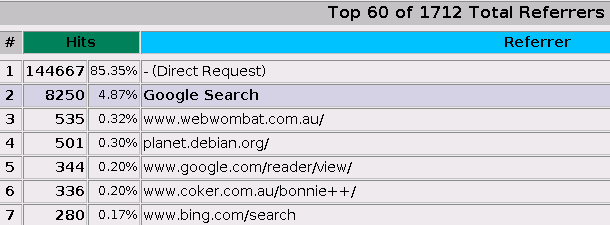
MSN uses 455M, Google uses 189M, and Yahoo uses 109MGoogle referrs 8250 hits, but Bing only refers 280

Above are sections of my Webalizer output related to my blog which show the data transfer use of search.msn.com (Bing presumably) which is 50% greater than that of Google and Yahoo combined. Why does MSN need to do 455MB of transfer so far this month to scan my blog when Google gets the job done with 189M and Yahoo only takes 109M? Also judging by the referrals Bing is only 3% as much use to me as Google.

MSN uses 525M, Yahoo uses 132M, and Google only uses 35M

Above is a sample of the Webalizer output from www.coker.com.au, MSN is using 525MB of data to scan the site which contains about 1.2G of static files that change very rarely. A Russian malware site seems to be downloading it three times a month, and Google only takes 35MB of data transfer to scan the site (which is probably still excessive).

If Bing was a quality search engine that returned appropriate results then this could be forgiven. But however it is a very poor search engine that returns bad results. For example if you query Google or Yahoo for “bonnie++” you will get an entire page of search results concerning my Bonnie++ benchmark, and those results are ordered in a sensible way. If you ask Bing then the first four results concern “Bonnie” (three women and a plant) and most of the first page don’t concern my benchmark.

Some time ago I had blocked MSN from scanning a server that I ran. The server in question had all the web servers for my domain plus quite a few other small domains. The total MSN data transfer was 3G per month which was almost half the data allowance for the server in question (data plans in Australia suck – that’s why my web servers are hosted in Germany now), so it was a question of whether to allow normal operation of the business or MSN searches. With Microsoft not running a popular search engine (then or now) it was an easy decision.

I think that anyone who accepts money from Microsoft/Bing is doing their users a mis-service. Bing is simply an inferior search engine, it gets bad results and imposes excessive costs on service providers. Yahoo however seems to be a reasonable service, not as good as Google for the web hosters but not too bad.

I wonder what would happen if Yahoo offered some sponsorship money to the Debian project in exchange for being the default search engine. I’m sure it would be dramatic.

13

Why Internet Access in Australia Sucks

In a comment on my post about (relatively) Cheap Net Access in Australia [1] sin from Romania said “Somebody needs to whack the aussie ISP in the head with a cluebat. The prices that you pay are insane“.

In Eastern Europe you have optic fibers from Germany and other western European countries that carry vast amounts of data. As the demand for capacity increases it’s not THAT difficult to lay more fibers. You also have competition between different companies that lay fiber. To get data to Australia you must lay cables under the sea, this is expensive and can’t be done quickly. Therefore all international data transfers are expensive to cover the expense of laying the cables. I don’t think that we have any real competition in the market for International connectivity from Australia either.

Now the links between Europe and the US aren’t cheap either, but I believe that there are economies of scale (as well as shorter distances) that make them significantly cheaper than the links to Australia.

Also a good portion of the traffic that you generate as a customer of a European ISP will stay within Europe as there are heaps of good sites in Europe. The number of people living in Europe who speak English as their first language is more than twice that of Australia. The number of Europeans who communicate in English almost as fluently as the native speakers (such as about half the population of the Netherlands) is also quite significant. I expect that the amount of English-language material on the net that is published from the EU is more than three times greater than the quantity published from Australia. People who speak languages that have a more limited geographic spread (IE anything other than English, Spanish, French, and Portuguese) will have a higher portion of local traffic which is therefore cheaper for their ISP. So based on the relative population sizes we should expect to have Australians making a higher portion of their Internet bandwidth be expensive international data transfers than that of Europeans.

Then of course there is the issue of server costs. Running servers in Australia is horribly expensive, while user access to the net is merely annoyingly expensive, the costs of hosting servers are significant – and usually the offers have slower hardware and slower transfers (particularly to the important US and EU markets). My blog is hosted in Germany because the company that was offering me free hosting in Australia encouraged me to host it elsewhere due to the price. Also hosting in Germany gives me slightly lower ping times to the US and significantly lower ping times to Europe. As about half the readers of my blog are based in the US, a significant quantity of the readers are based in the EU, and Australia only contains a small portion of the readers the overall experience for readers of my blog is improved by having it hosted outside Australia. It would be better to have it hosted in the US (where most of my readers are located) but I was offered free hosting in the EU.

It would be nice if there was a cheap and easy way of getting a mirror of my blog running in Australia with Geo-DNS so that people using Australian IP addresses would get a local server. Putting the static images on an Australian server would be trivial, setting up Geo-DNs would be painful and probably increase reliability issues later on but isn’t insurmountable (I have root on both DNS servers). The Debian blog gives some basic information on how to setup GeoDNS [2]. Then I would need to set up a MySQL slave for WordPress data and modify WordPress to send it’s writes to the master server – which is probably impossible for me unless someone else has already written a WordPress plugin for this, I’m really not good at PHP programming. Another possibility would be one of the WordPress cache plugins that maintain static files to avoid needless database lookups.

Until/unless I do such things, every Australian reader of my web site (and those of my friends who do similar things to me regarding hosting) will slightly tilt the balance of Internet transfers in favor of expensive data from foreign servers instead of cheap content from local servers.

Sometimes it just sucks to live on an island.

4

Cheap Net Access in Australia

The cheapest ADSL or Cable net access in Australia seems to be about $30 per month. I’ve been using 3G net access by the “Three” phone company for 18 months now and it’s been working well [1]. I recently bought a new 3G modem because the old one broke, so it has cost me $250 in modems plus $15 per month for the connection which compares well to $100 (or more) for an ADSL or Cable installation plus $30 per month.

My Three net access gives me 1G of data per month. I have just noticed that they have pre-paid net access that gives 12G of data that must be used within one year which costs $149 per year [2] – that is $12.41 per month or 83% the price of the plan access plus it means that any bandwidth quota that isn’t used in one month can be used the next month (so you can save up for upgrading to a newer distribution of Linux).

Dodo has pre-paid mobile net access on the Optus network for $139 which gives 15G of data that must be used within one year [3]. So that’s equivalent to $11.58 per month or $9.20 per gig.

A member of my local LUG mentioned that Exetel has a 3G plan which is good value if you don’t use much data transfer – but which has per-megabyte charges for excess data transfer. I couldn’t recommend it for my parents as I never know when they will do something that may transfer a lot of data, I could just imagine them saying “loading web pages was really slow for a week and then I got a big bill”.

Ross Barkman’s GPRS/UMTS page gives some critical information on using a 3G phone with a tether [4]. Using that information I discovered that I need to use “AT+CGDCONT=1,"IP","3netaccess"” in my chatscript to get ppp going with my old LG U890 mobile phone (with “3netaccess” being the important word).

I plan to give my old mobile phone to my parents and let them use prepaid 3G net access to reduce their net access bill by more than 1/3 while also giving them more data transfer quota for times when they need to transfer a lot (EG when my sister visits them). At this stage I’m not sure whether I will get them to use Three or Dodo. One advantage of Three is that I’ve used them a lot and know exactly how to get it all working, the other is that my old mobile phone is locked to Three – they agreed to unlock it on demand after the contract is ended (which happened over a year ago) but it will be a hassle to get it done. Saving the hassle of getting an old phone unlocked may be worth the $10 per year cost. Also I have used my 3G modem at my parents house on a few occasions and know that the reception is quite good, while the reception for Dodo (Optus) 3G is unknown

One extra benefit with doing this is that my parents will have some freedom to move their PC. If they decide that the computer room is too hot in summer and want to move their PC to below their air-conditioner they will be able to do so without needing a long Ethernet cable to connect their PC to the cable modem.

For my personal 3G net access (which I require for fixing servers on occasion) I am stuck with Three. When I bought a new 3G modem I decided to save about $20 by getting a device that’s locked to Three. 12G per year is more than enough for sshing to servers and checking email and if I had paid extra for the unlocked modem it would it would probably have died before the savings on net access made up for the higher purchase price.

Update:
Crazy John has a good deal, $129 for 7.5G which expires in a year [5]. I won’t use that for my parents though, the probability of them going over 7.5G is too high to make it worth the risk for a $10 saving.

1

Nagios and SSL in Debian

I was doing some work on NRPE (the Nagios Remote Plugin Executor) and I noticed bug report #547092 [1] which concerns the fact that the default configuration uses the same SSL certificate for all Debian servers and provides a patch to fix the problem. After building the patched package I followed the advice of the DebianAdministration.org article on creating self-signed SSL certificates [2].

cert_file=/etc/ssl/certs/FOO-cert.pem
privatekey_file=/etc/ssl/private/FOO-key.pem
cacert_file=/etc/ssl/certs/cacert.pem

Then I added the above lines to /etc/nagios/nrpe.cfg to instruct the nrpe to use the certificates.

For the Nagios server I had the problem that most of the systems I monitor run old versions of NRPE while only a few are recent Debian systems that allow me to easily install a new SSL checking nrpe. So I installed the following script as /usr/lib/nagios/plugins/check_nrpe to run either the old or the new check_nrpe:

#!/bin/sh -e
if echo $2 | egrep -q server0\|server2\|mail ; then
  /usr/local/sbin/check_nrpe -C /etc/cert/cert.pem -k /etc/cert/key.pem -r /etc/cert/cacert.pem $*
else
  /usr/lib/nagios/plugins/check_nrpe.orig $*
fi

The reason I started working on Nagios was to try and solve bug #560002 [3] which I filed. The bug concerns the fact that applications such as mailq which are run as part of Nagios checks were inheriting a TCP socket file handle from the nrpe. SE Linux prevents such file handles from being inherited, but it does mean that I get audit messages (and this is not a good case for a dontaudit rule).

Update:
One thing I forgot to mention is that the SSL key checking requires that the server common name used in the SSL certificate of the nrpe system matches the name that is used by the check_nrpe program. So if you check by IP address then you need to use the IP address in the certificate name – which is rather ugly. So I have moved to putting the hostname of each server in /etc/hosts on the NAGIOS system and using the hostname in the SSL certificate. This required using $HOSTNAME$ instead of $HOSTADDRESS$ in the NAGIOS configuration (thanks to John Slee for a tip in that regard).

Update2:
I removed some printf debugging from the script. It seems that I included a pre-production version of the script in the first version of this blog post.

7

TPG Lies

Shortly before 9AM this morning I discovered that the IP address for my mail server was not being routed, according to my logs the problem started shortly after midnight. It’s on a TPG ADSL connection, there is one IP address for the PPPOE link and 6 addresses in a /29 routed to it – one of the addresses in the /29 is for my mail server.

It wasn’t until 3PM that I was able to visit the server to sort the problem out. It turned out that the main IP address was working but the /29 wasn’t being routed to it. So TPG had somehow dropped the route from my routing table. I pinged all the addresses from a 3G broadband connection on my EeePC while running tcpdump on the server, and no packets for the /29 came through – but the IP address for the PPP link worked fine. I was even able to ssh in to the server once I knew the IP address of the ppp0 device – for future use I need to keep ALL IP addresses of all network gear on my EeePC not just the ones used for providing services.

So I phoned the helpdesk, and naturally they asked me inane questions. My patience extended to telling them the broadcast address etc that was being used on the Ethernet device (actually a bridge for Xen but I wasn’t going to confuse them). The system been power-cycled before I got there in the hope that it might fix the problem – so I could honestly answer the question “have you rebooted it” (usually I lie – rebooting systems to fix network problems is a Windows thing). But my patience started to run out when they asked me to check my DNS settings, I explained very clearly that my problem was that IP packets couldn’t get through and that I wasn’t using DNS and demanded that they fix it.

I didn’t get anyone technical to look at the problem until I firmly demanded that the help-desk operator test the routing by pinging my systems. The help-desk people don’t have Internet access so that actually testing the connection required escalating the issue. It seems that the algorithm used for help-desk people is to just repeatedly tell people to check various things on their own system, and that continues until the customer’s patience runs out. Either the customer goes away or makes requests firmly enough to get something done about it.

So their technician did some tests and proclaimed that there was no problem. While said tests were being done things started working, so obviously their procedure is to fix problems and then blame it on the customer. It is not plausible to believe that a problem in their network which had persisted for more than 15 hours would accidentally disappear during the 5 minute window that the technician was investigating the problem.

In the discussion that followed the help-desk operator tried to trick me into admitting that it was my fault. They claimed that because I had used multiple IP addresses I must have reconfigured my system and had therefore fixed a problem on my end, my response was “I HAVE A HEAP OF MACHINES HERE RUNNING ALL THE TIME, I USE WHICHEVER ONE I FEEL LIKE, I CHANGED NOTHING“. I didn’t mention that the machines in question are DomUs on the same Xen server, someone who doesn’t understand how ping works or what routing is wouldn’t have been able to cope with that.

I stated clearly several times that I don’t like being lied to. Either the help-desk operator was lying to me or their technician was lying to them. In either case they were not going to trick me – I know more about how the Internet works than they do.

TPG was unable to give me any assurance that such problems won’t happen again. The only thing I can be sure of is that when they lie they will stick to their story regardless of whether it works.

14

Gnash and use of Free Software

There is currently a discussion on a private mailing list about whether some money from a community organisation should be used to assist the development of Gnash (the free software Flash player) [1]. The main reason for this is that there are apparently some schools that depend on flash web sites to such a degree that they won’t consider using a free OS that lacks Flash support.

It has been shown that there are a number of issues related to contributing financially to free projects, the people who advocate financial contributions in this case assure us that such problems have been addressed but it will remain controversial to some extent. One thing that is not controversial is the fact that testing and debugging is universally a good thing. So I advocate doing such testing as a way to contribute to Flash development and therefore free software use in education.

The Debian-Edu project has a web page with a link to flash sites that can be used for testing [2]. So I plan to now install Gnash on all Linux desktop systems that I run and get bug reports to help development. I encourage others to do the same.

Also there is the Ming library for developing Flash files which could apparently do with some help in the development process [3].

While a non-free format such as Flash is not ideal, it’s certainly a lot better than Silverlight!

Note that I don’t have strong feelings about the issues of financial support for Gnash (which is why I didn’t contribute to the private discussion in question). But I am convinced that more people using and testing Gnash is a good thing.

1

NBD and PXE Booting on Debian

I have a Xen server that I use for testing which is fairly lightly loaded. I considered making it diskless to save some electricity use (which also means heat dissipation in summer) and also some noise.

The first step is to setup a PXE server. This is reasonably well documented in the Debian Administration article on setting up PXE [1]. Basically the DHCP configuration needs to include the line “filename “pxelinux.0”;” to tell the workstation the name of the file to download. This file is downloaded from a TFTP server, so you need to install one (I chose the tftpd-hpa package). The pxelinux.0 is provided by the syslinux-common package, I believe that the Debian Administration article errs in not mentioning this fact, they recommend using wget to download it which means that there is no verification of the file contents.

It appears that the way PXE works is that you are expected to have a directory named pxelinux.cfg under the root of the TFTP tree which then contains PXE configuration files. The Debian Administration article gives an example of using a file named default but you can also name a file for the MAC address of the workstation, a number which appears to be a GUUID for the workstation, and the IP address in hexadecimal (if that doesn’t exist then it will be truncated one nibble at a time, so 10.10.10.100 will result in searches for 0A0A0A64, 0A0A0A6, … 0). That’s what my HP test machine does.

The Debian Administration article shows how to configure PXE for installing Debian. But I wasn’t interested in that, I wanted to convert a system that is running as a regular workstation to be diskless. The first step in doing this is to install the nbd-client package which results in rebuilding the initrd to have support for diskless operation. Then you have to install the nbd-server package on the file server. The documentation for this package suggests that it is designed to serve regular files as block devices, but it appears to work OK with LVM devices. Adding an export section such as the following to /etc/nbd-server/config causes an LV to be exported via NBD:

[export]
exportname = /dev/vg0/workstation0
port = 12345
authfile = /etc/nbd-server/allow
listenaddr = 192.168.0.1

Then it’s just a matter of copying the filesystem from the hard drive to the LV that is used for NBD. I piped tar through ssh to copy the root filesystem of a running system. But I could have copied the block device or used debootstrap to create a new image from scratch.

NBD has an interesting design in that it exports block devices (which can be backed by files or real block devices) to a particular set of IP addresses and uses a particular TCP port for the export. So if you have two NFS exports from one server you might have 192.168.0.1:/home and 192.168.0.1:/data as exports but if you have two NBD devices you might have 192.168.0.1,12345 and 192.168.0.1,12346. This could be considered to be very sensible or utterly wrong.

The final thing to do is to setup a PXE configuration file. I put the following in a file named pxelinux.cfg/default, if I was going to deploy this seriously I would replace default with the IP address of the system.

DEFAULT lenny_i386

LABEL lenny_i386
        kernel lenny/vmlinuz-2.6.26-2-686
        append selinux=1 nbdroot=192.168.0.1,12345 initrd=lenny/initrd.img-2.6.26-2-686 root=/dev/nbd0 ip=dhcp --

The only things I needed to change in the image that I’m booting after transferring it from the hard drive is /etc/fstab and the network configuration /etc/network/interfaces – obviously if the network start scripts change the IP address of the workstation and thus make the root filesystem unavailable then things will break.

Wouter has some more background information on this [2]. He recommends using partitioned NBDs, that’s a matter of opinion, if I was going to use this in production I would use two NBDs, one for the root filesystem and another for LVM which would be used for everything else. I really like to be able to create snapshots and to change the size of LVs at run-time.
The down-side of LVM is that it can be really inconvenient to access LVM volumes when not running the machine that owns them – there is no support for using an LV as a PV (IE nested LVM) or for having two VGs with the same name running on the same machine.

Wouter also seems to be planning to write Debian Installer support for using NBD as a target. This would be a nice feature.

Now the next thing is to use Xen. Xen makes it a little more exciting because instead of having two essential files to be loaded (the kernel and the initrd/initramfs) you have three (the Xen kernel plus the other two). So we need to chain to a different boot loader. The Gentoo Wiki has good information on installing this [3].

The summary is that you need to chain the mboot.c32 loader from PXE which is then used to load the Xen kernel, the Linux kernel, and the initrd. Below is an example that I attempted. This loaded the correct files, booted Xen, and then hung. I didn’t investigate the cause.

DEFAULT mboot.c32 xen-3.2-1-i386.gz dom0_mem=258048 --- lenny/vmlinuz-2.6.26-2-xen-686 ro xencons=tty console=tty0 selinux=1 root=/dev/nbd0 ip=dhcp nbdroot=192.168.0.1,12345 --- lenny/initrd.img-2.6.26-2-xen-686

The configuration for mboot.c32 is particularly ugly. I think it would be better to have a replacement PXE loader which includes the mboot support.

I ended up deciding not to use NBD for the machine in question, the process of upgrading kernels (which is not uncommon on a test machine) would be made more difficult by the process of copying them to the tftp server, I guess I could write a script to rsync them. I had a problem with the system shutdown scripts killing the nbd-client process and hanging the system, I guess I could patch the shutdown scripts to ignore certain processes (this would be a good feature) or I could use SE Linux policy to prevent nbd-client from being killed by any domain other than sysadm_t. But generally it seemed to be more effort than saving 7W of power is worth.

7

How to Setup Bittorrent

The first couple of times I tried to setup Bittorrent I had a lot of trouble. Here is a basic summary of what you need to do:

btmakemetafile.bittorrent test.iso http://server.example.com:8000/announce

The above command will create a metafile named test.iso.torrent. Note that the server name (in this example server.example.com can be an IP address and any TCP port can be used (it’s generally best to use a port above 1024 to run as non-root). The “/announce” at the end of the string is vitally important, it won’t work without it – and you won’t get any usable error message! I have filed Debian bug report #511181 about this [1].

bttrack.bittorrent --port 8000 --dfile dfile

The above command starts a tracker listening on port 8000 and uses the file named dfile to store the recent downloader information. By default it will only allow downloads for .torrent files in the current directory, the --allowed_dir option allows you to specify another directory and the --parse_allowed_interval option allows you to specify the length of time in minutes between checking for changes to the list of torrent files.

In Debian you can edit the file /etc/default/bittorrent if you want the tracker to start on boot. There is no configuration for starting a btdownload program on boot (for seeding the data). In most cases it’s probably best to just run a couple of seed btdownload processes via screen on different servers and rely on the fact that you can login to restart them if the servers are rebooted.

btdownloadcurses.bittorrent test.iso.torrent

The above command needs to be run on a machine that has the complete test.iso file in the current directory to seed the torrent. Probably most people will use the same machine for creating the metafile, running the tracker, and running the seed download program. But these can all be done from different machines. This is the curses version which works from screen, there is also a btdownloadheadless.bittorrent program that is designed to be run from scripts.

Once all that is done any machine on the net can start downloading via the above command.

For the seed server the most useful option seems to be --max_upload_rate to specify the maximum transmission rate (otherwise it will eat all your transmission bandwidth).

2

Linux Rate-Limiting of an ADSL Link

After great pain I’ve got tc working on some Linux routers. The difficulty with limiting an ADSL link is that the ADSL modem has significant buffers and the link between the Linux machine and the modem is significantly faster than the ADSL upstream channel. This means that the transmission speed needs to be artificially limited, a speed of about 95% the maximum channel speed is often recommended. As ADSL upstream speed often varies (at least in my experience) that means that you must limit the transmission speed to 95% of the lowest speed that you expect to see – which of course means a significant drop in performance when the ADSL link is performing well.

I use the HTB queuing discipline to limit the transmission rate. My transmission speed varies between 550kbit and 680kbit in my rough tests. So I start by limiting the overall device performance to 550kbit. Then I have three different classes with IDs 1:10, 1:20, and 1:30 with rates of 64kbit, 480kbit, and 128kbit respectively. It is often recommended that the inferior classes have a total bandwidth allowance that is equal to the allowance for the overall link, but I have the three inferior classes allocated with 672kbit – I think that this will work as it will be quite rare that all classes will be in operation at the same time and fairly unlikely that I will ever have all three classes running at maximum speed. I will be interested to see any comments about this, I might have misunderstood the issues related to this.

Each class has a SFQ queue discipline associated with it for fair queuing within the class. It might be a bit of overkill, I expect to only have one data channel in operation on the VOIP class so it probably does no good there and my usage pattern is such that if the 480kbit connection is anywhere near busy then it’s due to a single large transfer. But with the power of a P3 CPU applied to the task of routing at ADSL speeds it really doesn’t matter if some CPU time is wasted.

Then the tc filter lines associate iptables marks with the classes.

Now this is only a tiny fraction of what tc can do. But I think that this basic configuration with the rate limits changed will suit many ADSL router configurations, it may not be an ideal configuration for most ADSL routers but it will probably be a viable configuration that will be better than having no traffic shaping. Below is the shell script that I am using:

#!/bin/bash -e

DEV=ppp0

tc qdisc del dev $DEV parent root handle 1:0 2> /dev/null | true
tc qdisc add dev $DEV parent root handle 1:0 htb default 30

# limit the rate to slightly lower than DSL line speed
tc class add dev $DEV parent 1:0 classid 1:1 htb rate 550kbit prio 1

# sub classes for each traffic type
# 10 is VOIP, 20 is default, 30 is the test network
tc class add dev $DEV parent 1:1 classid 1:10 htb rate 64kbit burst 6k prio 2
tc class add dev $DEV parent 1:1 classid 1:20 htb rate 480kbit burst 12k prio 3
tc class add dev $DEV parent 1:1 classid 1:30 htb rate 128kbit burst 12k prio 4

# use an sfq under each class to share the bandwidth
tc qdisc add dev $DEV parent 1:10 handle 10: sfq
tc qdisc add dev $DEV parent 1:20 handle 20: sfq
tc qdisc add dev $DEV parent 1:30 handle 30: sfq

tc filter add dev $DEV parent 1: protocol ip prio 1 handle 1 fw classid 1:10
tc filter add dev $DEV parent 1: protocol ip prio 2 handle 2 fw classid 1:20
tc filter add dev $DEV parent 1: protocol ip prio 3 handle 3 fw classid 1:30

iptables -t mangle -F POSTROUTING
iptables -t mangle -A POSTROUTING -j MARK --set-mark 2
iptables -t mangle -A POSTROUTING -p tcp --sport 22 -j MARK --set-mark 3
iptables -t mangle -A POSTROUTING -d $VOIPSERVER -j MARK --set-mark 1