3

Tithing for Open Source

It’s common to hear a complaint of the form “I get paid to keep computers running not hack an OS” coming from someone who uses an Open Source OS such as Linux, BSD, or Open Solaris.

It seems to me that part of the job of keeping computers running when using Open Source software IS to hack the source and fix bugs. This takes the place of praying, begging, and having your employer pay arbitrary extra amounts of money to the vendor when you have problems with proprietary software.

It’s well understood that a good system-administrator will anticipate problems and implement solutions to them in advance. You don’t wait for a system to run out of disk space and then fix it – you install cron jobs to compress and remove old log files and have a monitoring system to tell you if disk space really runs low.

It seems to me that the approach that many companies take towards fixing software bugs goes against this ideal. They wait for software to fail in production and then file a bug report and hope that someone else will fix it.

When allocating time for various tasks it’s not uncommon to have various amounts of staff time devoted to different servers, departments, or projects. I believe that having a fixed amount of time devoted to finding and fixing bugs in Open Source software (both current versions and pre-release versions) would save money for a company in the long term. If 10% of the time of the most skilled programmers was assigned to finding and fixing bugs in the OS then the overall quality would improve. If a company depends on Debian then it would make sense to have this 10% time include testing out the production programs on Debian/Unstable, it if depends on Red Hat Enterprise Linux then it would make sense to test them out on Rawhide. This would increase the ability of the future releases of Debian or RHEL to support the applications in question, and might also discover some application bugs.

Also it’s very important to submit patches with bug reports. It’s not uncommon for a bug report to be critically important to a user but not overly important to the rest of the world. Such bugs can stay in a bug tracking system for a long time without getting fixed. But if there is a patch submitted that includes necessary documentation patches and a description of the tests that it has passed then it will probably be easier to include it than to debate whether it’s really needed.

If a project is only running for a matter of weeks or months (EG a consulting company that comes in, deploys a “solution” and then leaves) then there is probably no benefit for doing this. But if a company is going to be running servers for many years which will periodically be upgraded then it would be a real benefit to have bugs fixed in future versions.

3

Google Server Design

Cnet has an article on the design of the Google servers [1]. It seems that their main servers are 2RU systems with a custom Gigabyte motherboard that takes only 12V DC input. The PSUs provide 12V DC and each system has a 12V battery backup to keep things running before a generator starts in the event of a power failure. They claim that they get better efficiency with small batteries local to the servers than with a single large battery array.

From inspecting the pictures it seems that the parts most likely to fail are attached by velcro. The battery is at one end, the PSU is at the other, and the hard disks are at one side. It appears that it might be possible to replace the PSU or the battery while the server is operational and in the rack.

The hard disks are separated from the motherboard by what appears to be a small sheet of aluminium which appears to give two paths for air to flow through the system. The thermal characteristics of the motherboard (CPUs) and the hard drives are quite different to having separate air flows seems likely to allow warmer air to be used in cooling the system (thus saving power).

Google boast that their energy efficiency now matches what the rest of the industry aims to do by 2011!

The servers are described as taking up 2RU, which gives a density of one CPU per RU. This surprised me as some companies such as Servers Direct [2] sell 1RU servers that have four CPUs (16 cores). Rackable systems [3] (which just bought the remains of SGI) sells 2RU half-depth systems (which can allow two systems in 2RU of rack space) that have four CPUs and 16 cores (again 4 CPUs per RU). Rackable systems also has a hardware offering designed for Cloud Computing servers, those CloudRack [4] systems have a number of 1RU trays. Each CloudRack tray can have as many as two server boards that has two CPUs (4 CPUs in 1RU) and 8 disks.

While I wouldn’t necessarily expect that Google would have the highest density of CPUs per rack, it did surprise me to see that they have 1/4 the CPU density of some commercial offerings and 1/8 the disk density! I wonder if this was a deliberate decision to use more server room space to allow slower movement of cooling air and thus save energy.

It’s interesting to note that Google have been awarded patents on some of their technology related to the batteries. Are there no journalists reading the new patents? Surely anyone who saw such patents awarded to Google could have published most of this news before Cnet got it.

Now, I wonder how long it will take for IBM, HP, and Dell to start copying some of these design features. Not that I expect them to start selling their systems by the shipping crate.

Linux Powered Battle Droids

Flame has written some ideas about building Linux Powered Battle Droids and demonstrating them [1].

It seems to me that the biggest problem with having a battle of a similar nature to Robot Wars [2] is creating a safe arena. Getting an area the size of a basketball court fenced off with bullet-proof plastic is not going to be cheap.

The first solution to this problem that occurred to me was to have a battle held underwater. Water really slows down projectiles. The disadvantages of this are that it’s slightly more difficult to view. The viewing options are to using a web-cam, having a port-hole in the side of the pool (impossible if you don’t own the pool), and having a transparent viewing platform on the surface of the water (which would also be difficult and maybe expensive). Another disadvantage of submarine warfare is that having a droid spring a leak and quietly sink is not very dramatic.

It might be a better option to use aerial warfare via helicopters and balloons. The amount of weight that such craft can carry is not particularly great so there will be no real armor and fairly weak weapons. A motorbike helmet and a heavy coat should be all the protective equipment that is needed if the usual rules prohibiting projectile weapons from such contests are implemented.

A petrol powered model aeroplane could do some serious damage if it hit someone at full speed. But I don’t think that an indoor basketball court or any other enclosed arena that might be available would be large enough for fighter-planes. So it would be just balloons and helicopters.

10

Choosing a Server for CPU Intensive work

A client is considering some options for serious deployment of some CPU intensive work. The options that are being considered include cloud computing (Amazon EC2 [1]), virtual machines (Slicehost [2] and Linode [3]), and purchasing servers to install in racks at various locations. I can’t disclose the criteria that will determine when each of those three options will be used (I expect that we will end up using all of them). But my research on the prices of various servers will hopefully be useful to someone.

For the server vendor I chose Dell. I believe that HP offers slightly better quality hardware than Dell, but they cost more and are more difficult to deal with (I can’t even get a price online). For this project I will be using a bunch of redundant servers (in a similar concept to the Google server array) so I’m not going to be overly bothered about losing a server occasionally – therefore the slight benefit that HP offers for reliability does not make up for the expense.

Dell has some 1RU servers that have two CPU sockets and allow eight CPU cores. It seems that the best value that Dell offers for a server without RAID (the entire server is redundant) is a PowerEdge SC1435 that has two Opteron 2352 quad-core CPUs running at 2.1GHz, 4G of RAM, a 1TB SATA disk, and a Broadcom PCIe Gig-e card for $3,816.50. That machine gives an option of 2.3GHz CPUs for an extra $621.50, I am not sure that increasing the clock speed by almost 10% for a 16% increase in system price is a good idea.

The second best option was a PowerEdge 1950 III that has two Xeon E5420 2.5GHz quad-core CPUs with 12M of cache, 4G of RAM and a 1TB SATA disk for $4,302.30. The Intel option has 3 years of support included while the AMD option included 1 year of support and needed at least an extra $990 for 3 years of support. So it seems that if 3 years of support is desired then the Intel based server becomes significantly cheaper and is probably a better option.

Dell’s 2RU and 4RU servers are of no interest if you want CPU performance. The 2RU servers only support two processors and the 4RU servers only support four processors. So it’s a ratio of 2 processors per RU for 1RU servers vs one processor per RU for 2RU and 4RU servers, and the 2RU and 4RU servers are a lot more expensive too.

I am investigating the Dell blade server. Blade servers are great for CPU density and good for management. The Dell blade enclosure M1000e takes 10RU of space and supports 16 half-height blades or 8 full-height blades. The Dell M905 blade supports four AMD quad-core processors for a total of 128 cores in 10RU, there are also half-height blades that support two quad-core processors for the same CPU density.

So in terms of CPU density it’s an average of 12.8 cores per RU for the blade server vs 8 cores per RU for 1RU servers. While I haven’t got a complete price yet, it seems that four CPUs suitable for the M905 will cost about as much as four 1RU servers. So the 1RU systems are definitely better value for money than the blade server. The difference is the management cost. N servers that have two CPUs will be more work than N/2 servers that have four CPUs, but on the other hand blade servers require some specialised skills to run them (which I don’t have) and that might also cause problems. I don’t think that blades will be part of this project.

1

Dear Magazines – Please Publish Your Adverts Online

When reading a magazine I often see an advert for a product that I want to buy (or recommend that a client buy). This is of course expected as the advertisers put a lot of effort into targeting their adverts to the people who read such magazines. However I often decide that I want to buy the product some weeks after reading the magazine.

Linux Journal [1] usually has adverts for good server hardware that supports Linux. Their web site is quite nice in many ways, it allows subscribers to read articles online and has an index to all back-issues. But it has no link that I could find for reading the adverts! I would like to see an index of all advertising that has ever been published so that I can read the adverts online. The ancient adverts are good for historical reference and the new ones are good for purchasing decisions.

Right now I would like to be suggesting that a client consider buying a number of servers from a company that advertises in Linux Journal, but I’m not because they don’t publish their adverts online!

To make matters worse the Linux Journal web site doesn’t include a suitable contact address for issues unrelated to subscriptions. I believe that a magazine needs to publish an email address for copyright infringement reports (I often notify magazines when someone rips off their content so that they can issue a DMCA take-down notice), an email address for technical problems (I often notice rendering errors and broken links in web pages and like to report them), and an email address for random stuff. I’m even happy to use a web-based form to submit my suggestions if that’s what makes them happy, but having no published way of notifying them is simply a mistake.

NB I do have some email addresses of LJ employees in my addressbook somewhere, I will send them email if no-one responds to this blog post. But I’m publishing this because it’s probably a mistake that other magazines make, and because any response from them is going to be too late for the report on hardware prices that I’m writing.

Update: Linux Journal does allow you to download a sample copy, that is a PDF of one complete issue that includes adverts. So I can see adverts from August 2008.

12

Netbook Thermal Issues

Recently there has been increasing attention paid to thermal issues. The power used by computers not only impacts the electricity bill (and battery life for a portable device) but is a cooling problem. The waste heat from desktop systems and servers costs energy (and therefore money) to remove by the air-conditioning system and the heat produced by small devices can impact where they may be used.

It seems that a temperature of 40C can cause burns if applied to the human body for any period of time. As it doesn’t immediately hurt this can happen without people noticing. A friend recently reported getting a large blister on his arm after drinking a moderate amount of alcohol and falling asleep next to his EeePC.

I have noticed that my EeePC 701 has an unpleasant pattern of heat dissipation. It appears to use only one small vent in the side to vent most of the heat (with some vents in the base for air intake) and the base is all plastic. Apparently such a machine draws 14W from the wall when in active use compared to my measurements of 20W for a Thinkpad T41p. The Thinkpad however has a significantly greater size, this means bigger vents (and therefore lower temperatures of the vented air). Also the fan inside the Thinkpad makes much less noise so I guess it’s larger.

If I am working in the lounge and leave my Thinkpad on the couch it doesn’t seem to have any thermal issues. But if I leave my EeePC sitting in a normal manner the vents on the base are partially blocked and it becomes unpleasantly hot. If I leave my EeePC upside-down with the lid closed (so that the vents in the base are exposed to the air) then the screen gets very hot, I am not sure whether this is heat from the CPU going through the keyboard to the screen and then being prevented from going further by the insulating cushion or whether heat is generated in the screen (although it is supposed to be powered down when the lid is closed).

One suggestion I have received is to place a laptop on a metal baking tray. The flat tray preserves the airflow underneath it and the metal conducts heat reasonably well. Baking trays seem to be made of aluminium or thin steel, they don’t conduct heat well – but a lot better than a cushion.

It seems to me that one factor which will limit the development of NetBook class machines is the ratio of heat dissipation to either area or volume (I’m not sure which is more important). For use similar to mine providing the same compute power as an EeePC 701 with less heat dissipation would be ideal – and technically should not be difficult to achieve. Unfortunately I think that people will want to run Windows on NetBook class machines so we will see the development of machines with faster CPUs and GPUs which have worse ratios of heat to heat dissipation potential which will lead to more heat induced shutdowns and low temperature burns.

It’s a pity that no-one makes a netbook with the CPU power of an iPaQ. A 400MHz ARM CPU is all I need for my portable computing and my iPaQs don’t have cooling vents.

3

Old PDA vs New Mobile Phone for PDA use

Since about 2002 I have been using a iPaQ [1] for taking notes while on the move. I have a pair of H3950 iPaQs that were given to me for the purpose of some software development work.

As modern mobile phones have telephony as a small part of their feature set I think it’s worth comparing a 2002 iPaQ with a 2009 mobile phone in terms of the note taking functionality.

I have just got myself an LG U990 “Viewty” mobile phone [2]. It has a screen resolution of 240*320 which is the highest resolution that is remotely common for a mobile phone – and the same resolution as my 2002 model iPaQ. The LG KC910 “Renoir” has a resolution of 240*400 and seems to be the only phone that my carrier provides which has a higher resolution. The iPhone [3] has a resolution of 480*320. So it seems that the most expensive modern mobile phone that is available in Australia has a screen resolution that is only twice that of a 2002 PDA. I believe that in Japan you could buy a PDA with a higher resolution than 240*320 in 2002.

My iPaQ is running Linux, so I can do whatever I want with it. I have a bar at the bottom of the screen with icons to launch, I configure it with the programs that I need most often and they are always one click away. While with my mobile phone I always have two large icons for paid services from my telco and I can’t add icons for the things that I want.

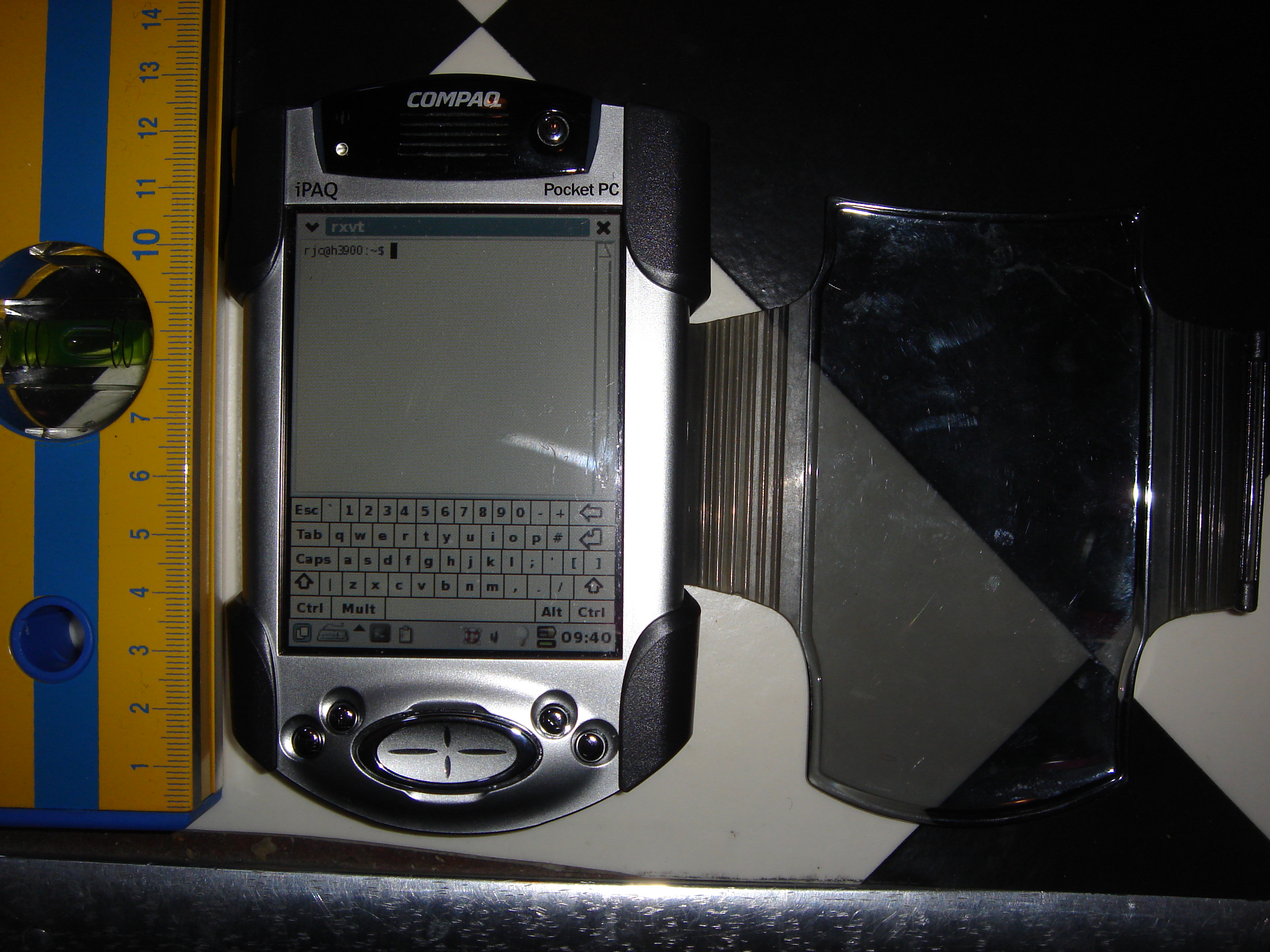
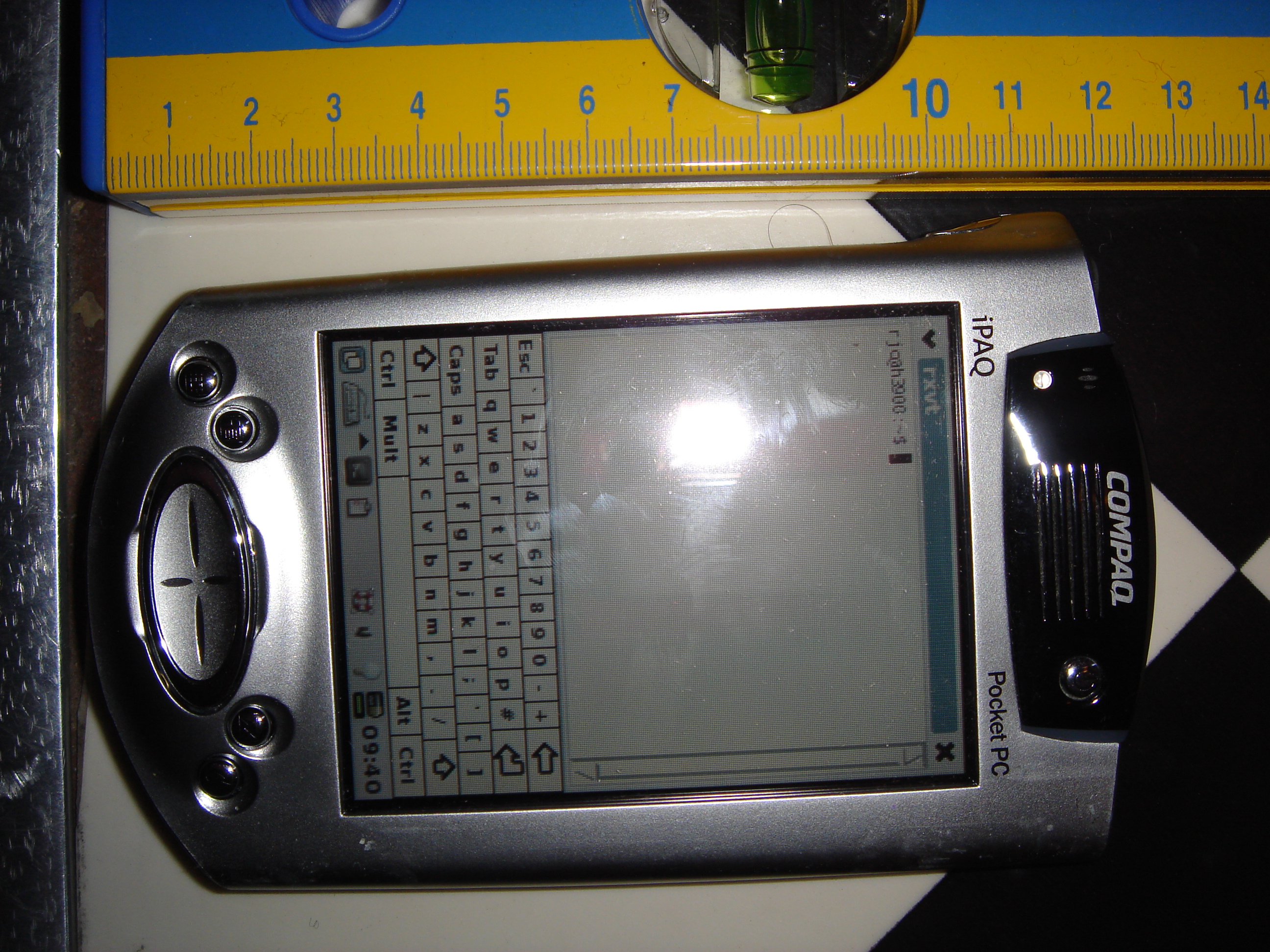
front view of iPaQ h3950 without sleeve front view of iPaQ h3950 with sleeve

My iPaQ has a virtual keyboard that can be displayed in portrait or landscape mode. The above pictures show it in the portrait mode which allows the greatest area of screen space for text. The landscape mode is good for entering long lines of text even though the total number of words that can be displayed on screen is smaller.

The size of my iPaQ is 134mm in height, between 77 and 84mm in width (it tapers) and 15.9mm thick without it’s protective sleeve. The protective sleeve (shown in the second picture) adds about another 5mm to the width and thickness.

My iPaQ is 1.76* the volume of my Viewty phone and at 184g vs 112g is 1.64* the mass. With it’s sleeve on it is about 2.4* the volume. It’s larger but with the sleeve it’s a lot more solid, a touch-screen is very fragile so putting a touch-screen device in your back pocket without a sleeve is not a viable option.

So I now own a mobile phone that has more storage, RAM, and CPU power than my iPaQ, but is less useful for the basic task of writing small documents and seems to have no facility for drawing diagrams. Most recent mobile phones have the ability to record voice (my Viewty can store 34 hours on it’s internal storage and supports mini-SD cards for extra storage). But my Viewty lacks the ability to pause voice recording so if I wanted a series of notes during a meeting I would get a series of short voice recordings rather than a single file with many items. The todo list is also fairly poor in the Viewty, so even disregarding the poor keyboard on the touch-screen it would compare badly to the iPaQ.

So it seems that an iPaQ that is almost seven years old when running Linux and the GPE Palmtop Environment [4] with with default configuration handily beats one of the latest and greatest mobile phones for all areas of common functionality.

If the Viewty had it’s source code available I would be tempted to contribute some patches (even if it was not free software).

Finally, before someone suggests an Android [5], Greenphone [6] or other phone that’s relatively open and programmable, I wanted a phone that had a good camera (by phone standards) and came essentially for free on an affordable contract. Maybe in two years time (when my current contract ends) there will be such a phone on offer. Mobile phones aren’t THAT important to me, so while I would like to encourage the development of open telephony platforms it’s a much lower priority than about a dozen free software projects.

I expect that in the future something like an Android will become a great mobile phone with great PDA functionality. But for the moment I’ll use an iPaQ and a Viewty.

4

Video Camera for Shared Movies

I have never felt inclined to create content for Youtube due to the low resolution of the display and the fact that only one format is supported (Flash which is totally non-free).

The existence of blip.tv has inspired my interest in creating videos for distribution on the net. blip.tv has higher resolution than Youtube and supports multiple formats. Currently the multiple format support is limited to allowing users to upload whatever they want and then Flash (FLV) will be provided for download in addition to the original file(s). So for example I could upload MPEG4 and Quicktime movie files for the same content which would result in three download options (MPG, MOV, and FLV). It would be nice if they could support more formats as the default (maybe support transcoding to OGG), but it’s certainly a lot better than Youtube.

So the question then is how to create content. One option that I plan to use is Istanbul – the GNOME desktop session recorder [1]. It will record everything that happens on the desktop (or a section of the desktop) to an OGG file while also optionally recording audio input. This allows the creation of tutorials for performing various tasks on the computer.

Another option is to do animation, either completely computer generated or by combining a set of JPEG files into an animation file. This doesn’t interest me to the degree necessary to make me invest the necessary time.

But the most common way of producing video content is via a camera. So the question becomes what camera to get.

My current camera is a Sony Cyber-shot DSC-T5 [2]. It is a 5.1 mega-pixel camera with 3* optical zoom and supports 640*480 resolution movies at up to 30 fps. The quality of photos and video that it produces seems to be quite good, I don’t have any particular problem with the camera that I want to address by purchasing a new one, so a major aim of buying a new camera was the fact that it’s a few years old and something better must be available at a low price!

I asked for advice about this on my local LUG mailing list. One piece of advice that was offered by several people was to use a Digital Video camera with Firewire output to record quality video. They spoke about common digital cameras as “point and shoot” with the acronym “P&S” – which seems to be used as a term of abuse by people who are really into cameras. If using a DV camera with Firewire support (which is apparently a really important feature) then apparently Kino [4] is the program to use to capture the raw video data.

While the advice in regard to a digital video camera sounds good I’m not going to take it. Such DV cameras start at about $300 and appear to be physically larger. While a larger camera (with a larger lens) will give better quality pictures and higher frame rates with lower levels of ambient light I am planning to do my serious video recording in a controlled environment with reasonable lighting. Really I’m not THAT serious about video recording, so I don’t plan to spend $300 or more – I’ll accept the lower quality as a trade-off for lower price and greater convenience.

I have seen an advert for a camera described as a DC-777 at a good price from DirectBuy.com.au [3]. The camera in question is one that has no reviews anywhere on the net and seems to be a re-badged version of someone else’s camera. It initially sounded quite good with 11mega-pixel resolution, but the fine print shows that it has a 7MP CCD and uses interpolation to get a higher resolution. Also the movie capability is 640*480 at 30fps (the same as my Sony). So the benefit of using the DC-777 would be the rotating display which can face the same direction as the lens thus allowing someone who is making a video of themself to see what they are creating. This doesn’t seem to be $200 worth of benefit, but the camera might be a reasonable deal for someone who doesn’t already have a decent “P&S” digital camera.

Another interesting piece of advice I received from my local LUG was that the amount of time taken to get a good image (which determines the shutter speed on a good camera or the maximum frame rate for video) is determined in part by the size of the elements in the CCD. So with all other things being equal a camera that supports higher resolution will require longer exposure. For my use the benefit of higher resolution photos is often for the purpose of cropping pictures of objects that were too far away to allow completely zooming in. 3* optical zoom (as implemented in my current camera) is a limit when photographing objects that are far away in good light conditions (in poor light it’s often a factor of the lens size).

In the past when looking at digital cameras I would make the resolution of the picture the prime criteria – with the idea that bigger is better. But now it seems that the smart thing to do is to make optical zoom the prime criteria for general purpose camera use. Also having a larger lens is a significant benefit, but as the overall volume of the camera is going to be roughly proportional to the radius of the lens cubed it can’t get that big without some serious compromises on portability.

Obviously an SLR [5] offers significant quality benefits. But if you are unwilling to spend so much money a good result can be obtained by what are sometimes called “Big Zoom Digital” cameras. These are cameras with a body shape that resembles a SLR, they vary in size between the P&S cameras and SLRs, and have fixed lenses that are significantly larger than those of P&S cameras. I gave such a camera to a relative for Christmas and I was very impressed by the quality of pictures and movies that it produced. I chose a Kodak camera with 12* optical zoom which was quite impressive (unfortunately the 15* model had sold out). One of the benefits of a Big Zoom Digital camera over a DSLR is that as there is no option to replace the lens there is also no possibility to get dust inside the camera (which is apparently a problem with SLR cameras).

For my own use I plan to stick with my Sony Cybershot. I can’t get anything significantly better for an amount of money that I am prepared to spend, and I also don’t really want a larger camera. So I think I’ll buy a tripod (or maybe two tripods of different sizes), that should deliver a real benefit for my photography without costing much.

Update: One thing I forgot to mention is the film speed rating (AKA the “ISO” number) [6]. A higher ISO number means that the camera can take faster pictures in less light. The Wikipedia page reports that camera manufacturers are permitted to interpret the ISO scheme in several different ways, so they can essentially just make stuff up. Probably the best that can be said for the ISO number is that any camera which advertises it is aimed at more serious users and is therefore likely to be of higher quality. I’m sure that if I was to spend $700 or more then I would get a camera with an advertised ISO number that actually means something, but I don’t have any plans to ever do that.

Matt made a good comment that the quality of the glass matters. For an SLR you can consider the lens quality independently of the quality of the rest of the camera. But for cheap cameras it’s just a matter of the entire package.

9

Slicehost vs Linode

Six months ago I investigated the options for Xen virtual servers [1]. I ended up receiving an offer of free hosting and not needing that, but the research was useful. There is a good range of options for Xen servers with different amounts of CPU power, RAM, bandwidth, and disk space. There are a couple of things that seem to be missing, options to upgrade from virtual servers to physical servers, and information on dedicated disk and database performance – but I’ll explain that later after some history.

About a week ago a client needed a Xen virtual server in a hurry, their main server (a Xen system that I run on hardware that they rent) was getting a bit overloaded and needed to have one of the largest DomUs moved off. I ended up recommending Linode [2] based on my research and comments I received. The Linode server is working quite well and the client is happy, one nice feature of Linode is the choice of server rooms that they offer. I was able to choose a room in the same region as the other servers that the client owns and thus get ping times that are sometimes less than 2ms!

Due to a missing feature in a program that I’m maintaining for the client a large number of MySQL queries are being made. Due to a problem I’m having with MySQL it won’t let me create a slave database server so all the queries go over the VPN and use a large amount of data. This combined with the other traffic that should be going over that link means that about 600G per month is being used, fortunately that is rather cheap. Linode staff handled this very well, after the server had exceeded it’s quota by 120G they asked my client to confirm that the traffic was legitimate and then suggested an upgrade to a plan that could handle the traffic (which went smoothly). Now I have another week to add the feature in question before I meet the quota again.

Shortly after getting the new virtual server running at full capacity David Welton wrote a detailed review of Linode and Slicehost for the issues that matter to his use [3]. His conclusion seems strongly in favor of Linode.

But now I am looking at getting a Slicehost [4] virtual server for the same client (for a different project) because Slicehost is owned by Rackspace [5], and the new project if successful will need a set of powerful servers and Rackspace seems like a reasonable company to host that.

The problem with Rackspace is that they (and every other ISP I’ve researched so far) seems to offer little in regard to customers who need serious disk IO. I am planning some servers that will have a write bottleneck on a MySQL database (or maybe multiple shards), so serious disk capacity is needed. At least I would like to be able to get disk storage by the tray (12-14 disks) with the controllers having RAID-6 support. Rackspace only offers RAID-5 (according to the “livechat” person), and we didn’t get as far as discussing how to add more trays.

What would be ideal is if there was an ISP that had both virtual servers and physical servers (so I could start with a virtual server and move to a physical server when things are working well), and also serious storage options. They would offer internal disks, external RAID arrays, and NetApp Filers [6] (or some equivalent device). It would be really nice if I could just instruct the ISP to add another NetApp Filer to my back-end network and have it done for me (I’m certainly not going to visit the US to install new hardware). It’s been over a day since I submitted a sales request to NetApp asking whether they partner with any ISPs and I haven’t received a response.

OpenSolaris with ZFS also sounds good for disk IO performance (they have similar features to NetApp). Unfortunately the support for OpenSolaris among ISPs is not that great (while everyone offers Linux and Windows), and I haven’t used any recent version of Solaris. So using OpenSolaris would require finding someone with the skills to manage it who can work for my client – as opposed to a NetApp device that would be just like any other NFS server, SAN, or iSCSI server. But I’m not ruling OpenSolaris out, if someone knows of a good ISP that hosts OpenSolaris machines and supports adding dozens of disks and decent amounts of NVRAM for ZFS then I would be interested to investigate it. Joyent has some interesting OpenSolaris virtual server plans [7], they are a little pricey but offer large amounts of data transfer. They don’t provide any information on disk IO capacity (other than saying that they use ZFS for good performance). I’ve just downloaded Nexenta (Debian with the OpenSolaris kernel) [8] and will test it out over the next few days.

One of the reasons I’m tending towards Rackspace at the moment (with Slicehost as the entry point) is that they seem cooperative to customer requests. My discussions with them (on a web based “livechat” and on the phone) have indicated that they may be able to do something special for me.

10

Flash Storage and Servers

In the comments on my post about the Dell PowerEdge T105 server [1] there is some discussion of the internal USB port (which allows the use of a USB flash device for booting which is connected inside the case).

This is a really nice feature of the Dell server and something that would be useful if it was in more machines. However I believe that it would be better to have flash storage with a SATA interface on the motherboard. The cost of medium size flash storage (eg 4G) in the USB format is not overly great, if soldered to the motherboard or connected to a daughter-board the incremental price for the server would be very small. Dell servers shipped with a minimum of an 80G SATA disk last time I checked, it seems quite likely to me that Dell could reduce the prices of their servers by providing flash storage on the motherboard and having no hard disk.

It seems likely to me that there is a significant number of people who don’t want the default hard drive that ships with a Dell server. The 80G disk that came with my PowerEdge is currently gathering dust on a shelf, it was far to small to be of any use in that machine and Dell’s prices for bigger disks were outrageous so I replaced the default disk with a pair of big disks as soon as the server had passed some basic burn-in tests. Most servers that I run fall into one of two categories, machines which primarily do computation tasks and need little storage space or IO capacity (in which case 4G of flash would do nicely) and machines which have databases, backups, virtual machine images, and other big things (in which case anything less than 160G is silly and less than 500G makes no economic sense in today’s market). Note that for a machine with small storage requirements I would rather have a 4G flash device than an 80G disk, I am inclined to trust flash to not die but not trust a single disk, two 80G disks means more noise, heat dissipation, and expense.

According to comments on my previous post VMWare ESX requires a USB boot device, so if VMWare could be booted with a motherboard based flash device then that would be an ideal configuration for VMWare. In some mailing list discussions I’ve seen concern raised about the reliability of permanently connected USB devices, while I’ve only encountered USB problems related to buggy hardware and drivers other people have had problems with the electrical connection. So it seems that motherboard based flash could be expected to increase the reliability of VMWare servers.

The down-side to having flash permanently attached to the motherboard is of course the impossibility of moving the boot device to different hardware. In terms of recovering from failure restoring a few gig of flash storage from backup is easy enough. The common debugging option of connecting a hard drive to another machine to fix boot problems would be missed, but I think that the positive aspects of this idea outweigh the negative – and it would of course be an option to not boot from flash.

If anyone knows of a tower server that is reasonably quiet, has ECC RAM and a usable amount of flash storage on the motherboard (2G would be a bare minimum, 4G or 8G would be preferred) then please let me know.